Read with Claude
 Read with ChatGPT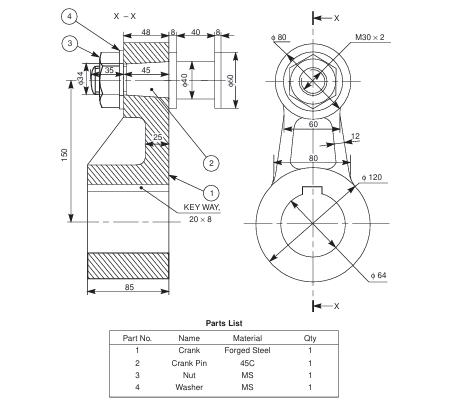
Large Language Models (LLMs) are only as good as the data they consume. For industries like engineering, construction, and manufacturing, much of that data lives in documents**,** manuals, schematics, reports, and drawings, often in PDF format.
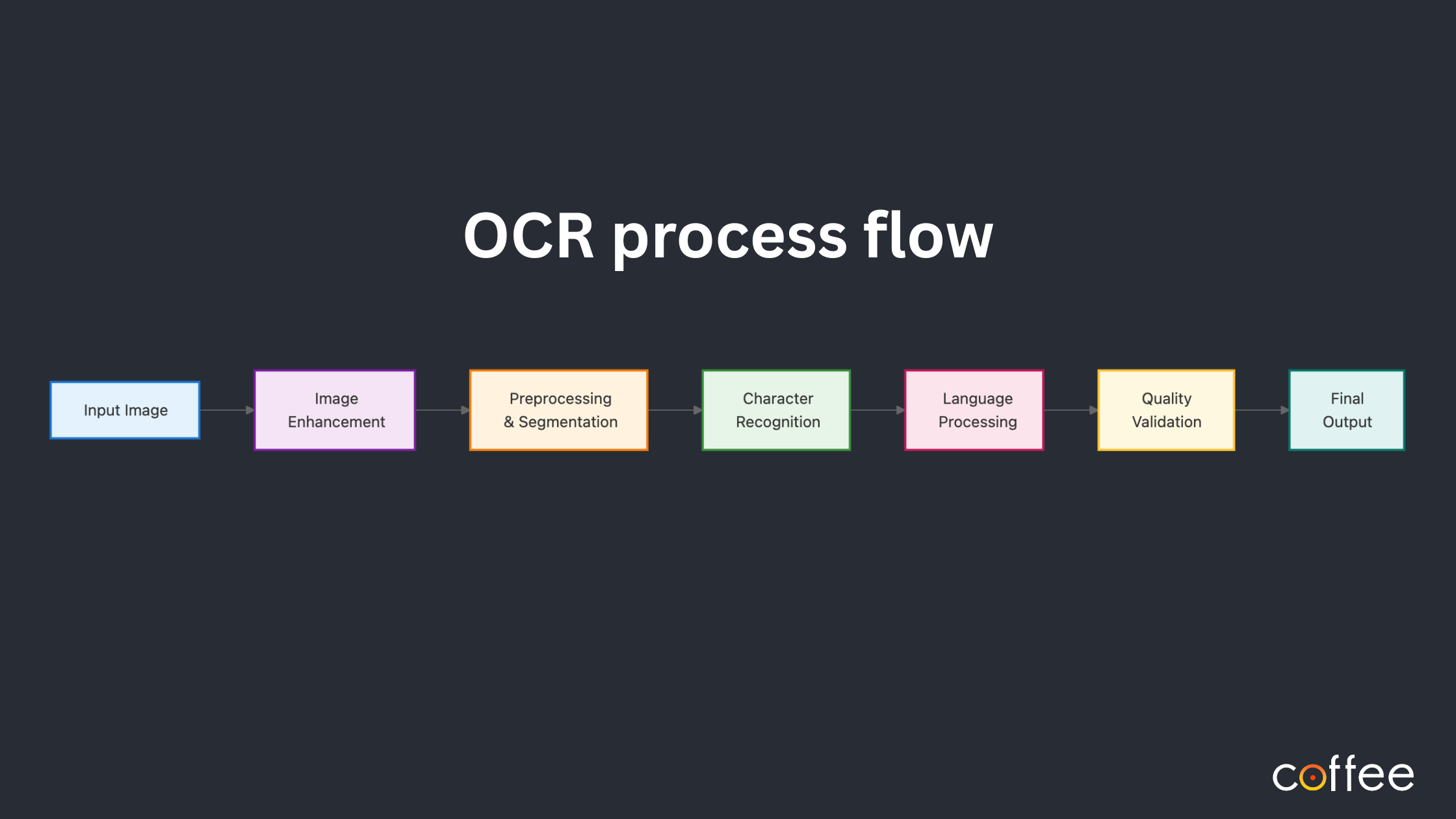
The problem? Raw PDFs are a nightmare for LLMs. They are a blend of text, tables, diagrams, title boxes, and annotations, all mashed together without a consistent structure. Unlike databases, where retrieval is straightforward, PDFs require extraction, cleaning, and formatting before AI can truly understand and use them. We have discussed this before when examining OCR for data extraction.
Beyond OCR: Anomalies in Data Extraction from Engineering Drawings
If we want LLMs to provide accurate answers, reason over technical details, or integrate with domain-specific knowledge, we must first transform these unstructured documents into LLM-ready structured data.
Why Engineering Document PDFs are a Challenge for LLMs
Engineering documents are not just text files you throw into a model. They represent a mix of unstructured data: headings, key-value pairs, marginal notes, tables (sometimes on different pages), diagrams like engineering blueprints or flow charts.
Engineering document page layout
All of these contribute to the challenges:
- Layout Variability: A pdf could have a table embedded in a single paragraph; it could have a diagram with tiny notes; it might have a title box that is very important text in the corner.
- Format Inconsistency: PDFs and documents do not have a standard format like structured data (e.g., JSON). A technical manual may have a bill of materials (BOM) on one page, and then on the next page have a narrative about the BOM but the LLM no longer associates the two.
- Extraction Complexity: Extracting certain elements like the data form a table or labels in a diagram means understanding the layout, which LLMs cannot do easily.
- Context Fragmentation: If the processing of the original context does not take place, it is rendered non-informative.
An example of this is how an LLM can take a table as a simple text portion, thus losing context by failing to process all of the legend from a diagram. As a result, these omissions can lead to a non-usable or non-accurate answer from an LLM. - Domain Specificity: Certain organizations are building domain specific LLM agents and want their model to leverage internal documents, for example, the machinery specifications for a business that manufactures industrial machinery, or the contracts relied upon for a law practice.
The above is a very real issue for businesses that are trying to enhance their LLM models for greater smarts and better alignment with the business environment. It is very difficult to create a next generation AI agent when the foundation is poor structured unreadable pdf files. So, what is the solution?
The Solution: A Pipeline to Convert PDFs into LLM-Ready Data
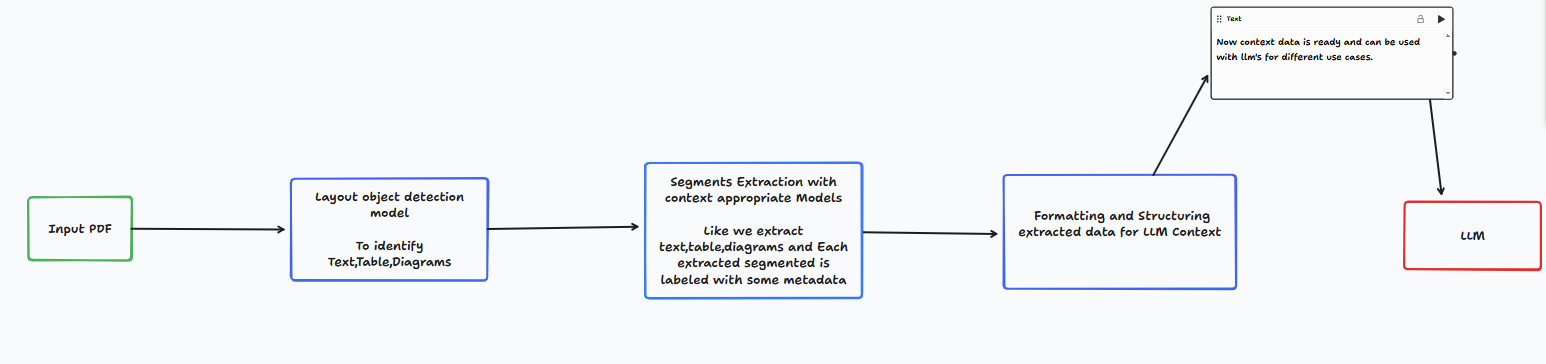
The first step towards extracting PDFs for LLMs is a structured pipeline that converts raw files into clean, machine-readable data. The workflow has object detection and extraction models and pays attention to formatting to extract any given PDF into context that LLMs can effectively process. The process is outlined below in individual steps:
Step 1: Layout Detection
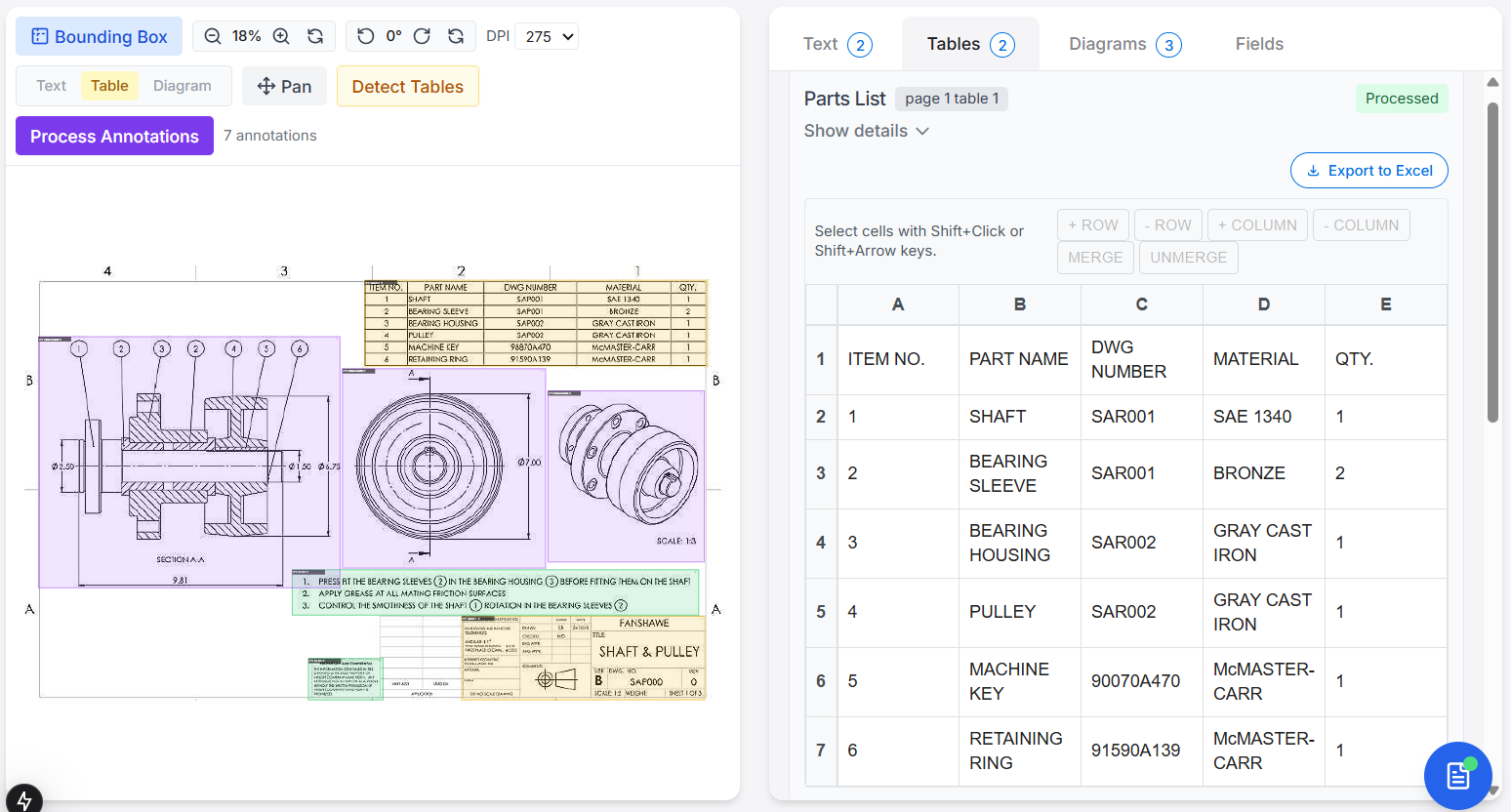
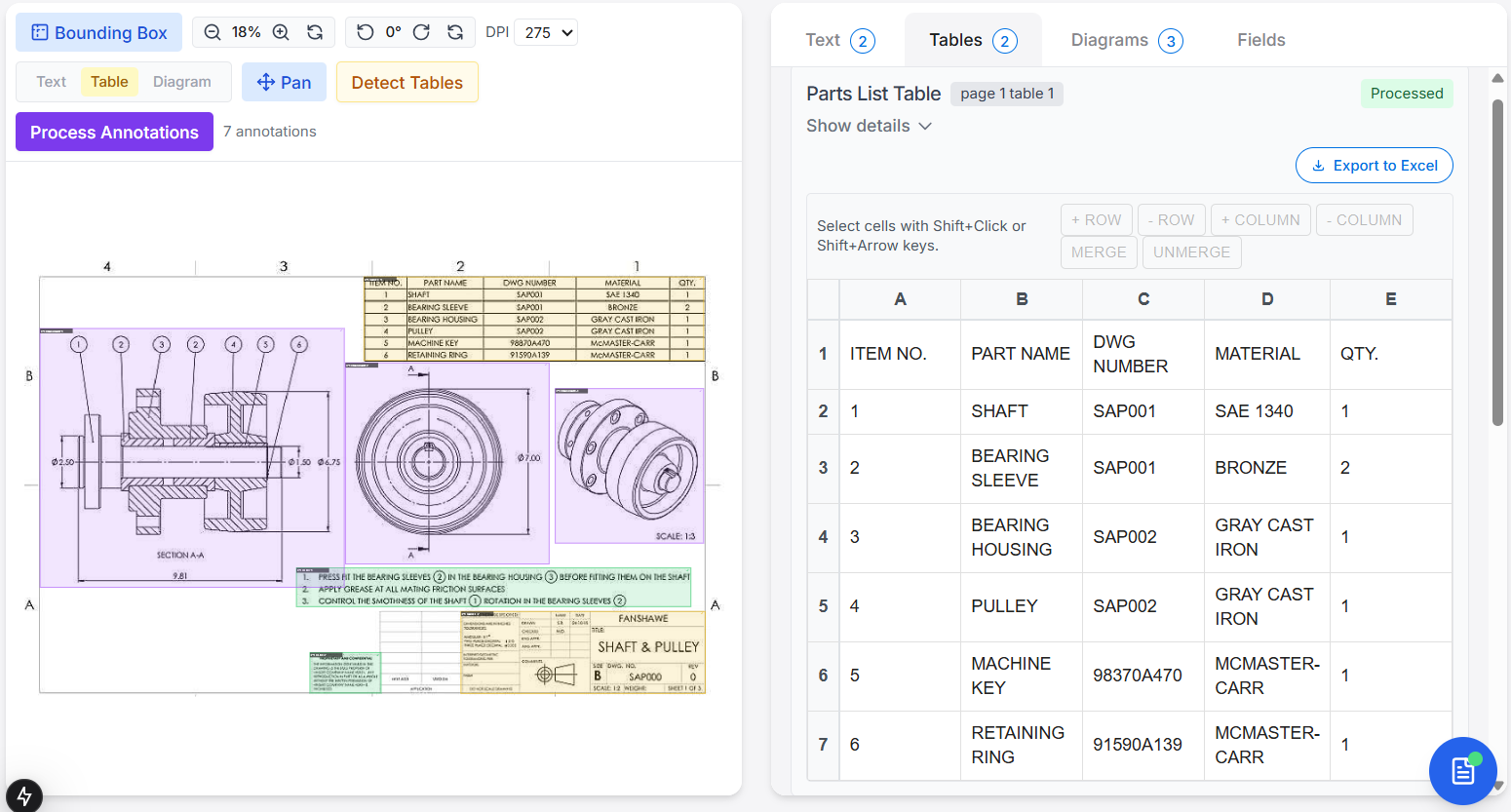
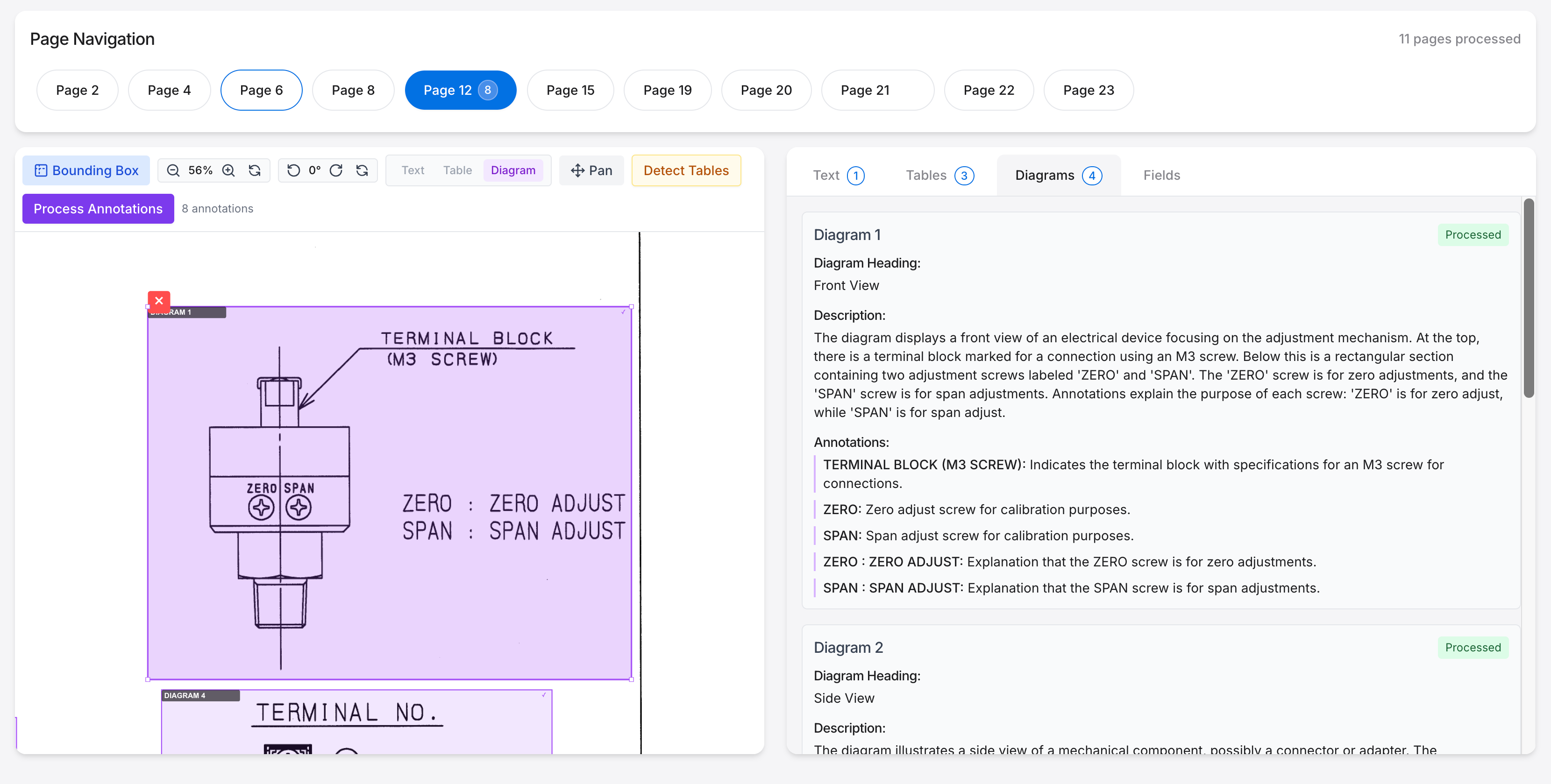
We start with a PDF, could be a single-paged bill of materials, or a 1,000-paged engineering manual. The initial concern is figuring out the layout of each page. We use object detection models like YOLOv13 to produce a “layout map” that marks bounding boxes for:
- Text Elements: Normal paragraph, key-value pairs (e.g. “Project ID: X123”), titles, subtitles, and marginalia (comments or side-notes often found in technical documents).
- Tables: Ordinary tables, bills of materials (BOMs), subtables (within larger tables), empty tables, or title boxes (i.e. box with document meta-data such as author or date).
- Diagrams: Engineering drawings, flowcharts, images, or anything visual, generally with some kind of notes or labels around the visual elements.
This segmentation acts like “blinders” for the AI, letting us target each region independently rather than dumping the whole noisy page into a single model.
Step 2: Segments Extraction with context appropriate Models
Once the layout is mapped, we process each segment with the right specialized extraction agent:
- Text extraction: Text segments will use OCR models and combined LLM for the context. For example extract a key-value from example but I will extract “Client: Acme Corp” into our structured dictionary ({“Client”: “Acme Corp”}). In addition we will also extract segments such as title and marginalia.
- Table Extraction: Getting the tables out of documents is a cut more complicated, especially complex tables like BOMs, or tables that are split across multiple pages. For example, a BOM could have a model outputting the following JSON structure: {“Part”: “Bolt”, “Quantity”: 50, “Unit Price”: “$0.10” }. If the table were a nested or multi-page table, the model could stitch the outer extent of the columns for the top-level row items, so that any relationships were maintained, and no information was lost.
- Diagram Extraction: Extracting diagrams is even more complicated because they require visual comprehension. So, we need to take an image as input and analyze it to identify any annotations in the image (e.g., “Shaft Diameter: 5cm”), and generate text, if required, that describes the image (e.g., “A cross-sectional view of a turbine with labeled components.”). This text gives important context to any machine learning logic run on the image, which is then based on the raw visual data.
Each extracted segmented is labeled with some metadata, following a common schema. This includes the page number of the source document, the type of segment extracted (page, segment type, etc), and the coordinate data of the extraction (page, bbox of the extracted segment, etc). If we extract a table from page 7 of a document, metadata will include:
{
  "type": "table",
  "page": 7,
  "bbox": [100, 200, 300, 150],
  "data": {...}
}
Step 3: Formatting and Structuring for LLM Context
The extracted segments are now raw materials, text, tables, and descriptions of diagrams respectively. The next step is formatting them into usable data as a context for LLMs. For this formatting process we will consider:
- Text Formatting: Paragraphs are cleaned and stored as plain text (or markdown). Key-value pairs are cleaned and stored either as dictionaries or JSON, whichever is the easiest to query.
- Table Formatting: Tables are output as JSON, CSV, or markdown tables whatever needed for the LLM. For example, if a BOM table it could be output as a JSON array, making it easy for the LLM to parse out quantities or prices.
- Diagram Formatting: Diagrams are output as image files (if required), with a textual description or annotation. For example, a blueprint may have a description like “Diagram showing a hydraulic system with valves labeled”.
Now after all these steps we can use this final formatted usable data as context to LLMs. But how we can use this as context to LLM, let us see in below section.
Three Use Cases for LLM-Ready PDF Data
Alright, you have got structured data, now what? Below you will find three specific use cases where structured data can truly change the game:
1. Fine-tuning engineering LLMs
Making use of the proprietary document’s LLM-ready structured data, we can now fine tune the LLM to give us specific data responses.
For example, a manufacturing company will extract tables, dimensions, and component labels from their internal CAD drawings and assembly blueprints to fine-tune their own LLM to answer questions about part specifications and assembly procedures. The structured data ensures that the LLM learned the correct technical annotations, dimension callouts, and the right relationships between components (e.g. bolt specifications to torque requirements). Essentially, an LLM that is ‘better’ compared to generic LLMs for interpreting technical documents.
2. Retrieval-Augmented Generation (RAG)
The extracted data can be been transferred into a RAG, the extracted data can provide very specific context for LLMs.
Imagine an engineer asking “what’s the shaft diameter tolerance in drawing X123-A?” An LLM can simply search the structured data from engineering drawings and retrieve the exact dimensional information they require. It could extract the annotation data (e.g. “Shaft Diameter”: “5.00 ±0.01 mm”) and accurately respond to the engineer. RAG helps LLMs create contextual awareness about technical specifications, limiting hallucinations and creating reliability for domain specific questions.
3. Automated Document Summarization
Structured document data allows LLMs to produce comprehensive summaries of complex engineering drawings. For example, we could extract specifications from assembly drawings, bill of materials, title blocks, and annotations, then concisely summarize the drawing’s purpose and key technical details (e.g. “Assembly drawing for hydraulic pump housing, 15 components, operating pressure 3000 PSI”).
Conclusion
Better data means better AI. For engineering documents, this means going beyond simple OCR and embracing layout-aware, segment-specific extraction pipelines.
By detecting, isolating, and structuring each element of a PDF, we bring out its hidden value, turning static manuals, drawings, and tables into rich, queryable knowledge for LLMs.
Tools like Adeos FE and Agentic Document Extraction show how this process can scale, enabling businesses to feed their AI systems with accurate, context-preserved, domain-specific data, the real fuel for intelligent applications.
At Coffee, we are working on Adeos, a data extraction tool that can be used to extract key information from engineering drawings with this exact pipeline in place. If you are interested to learn more, reach out to us.