Read with Claude
 Read with ChatGPT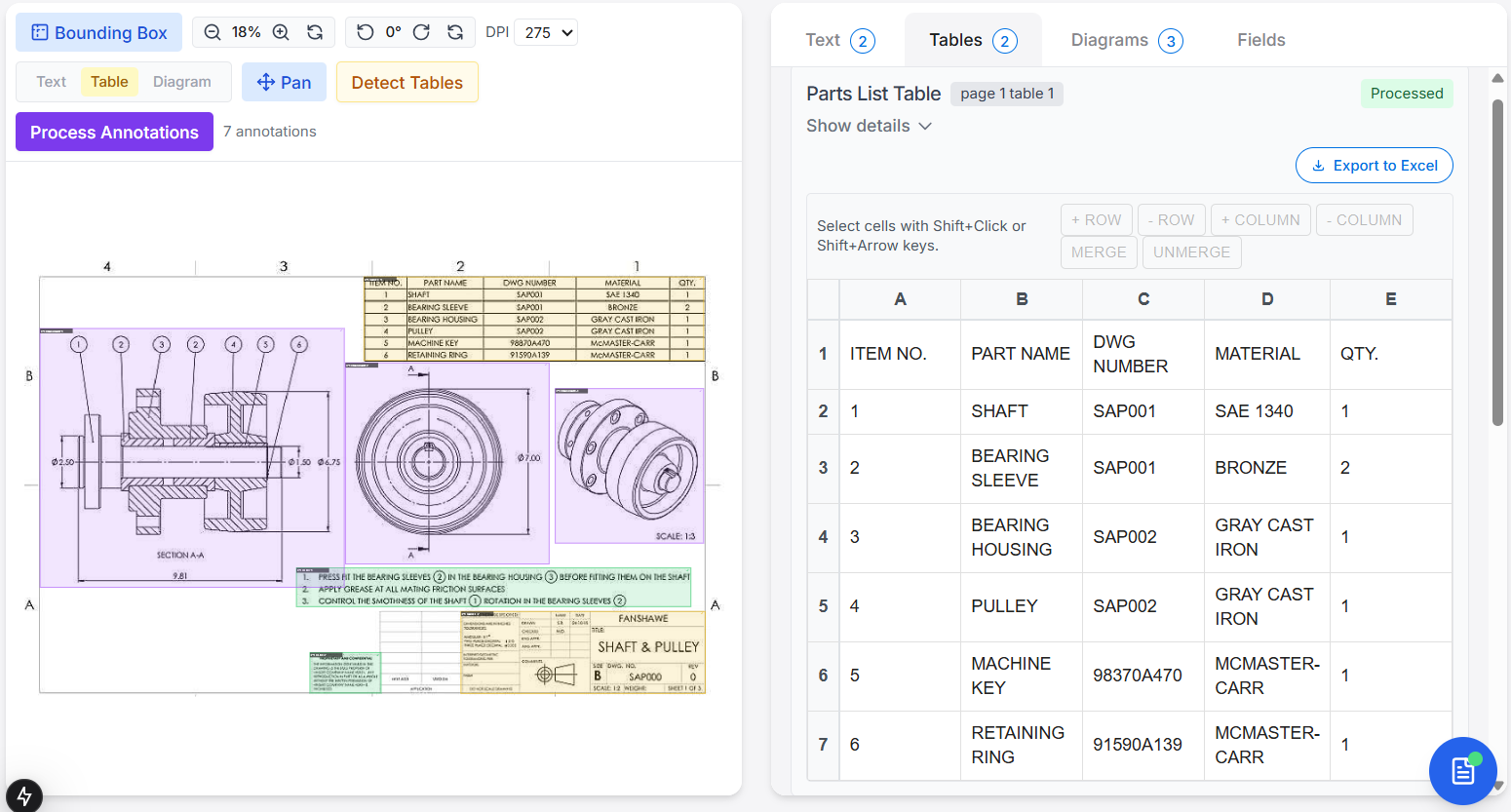
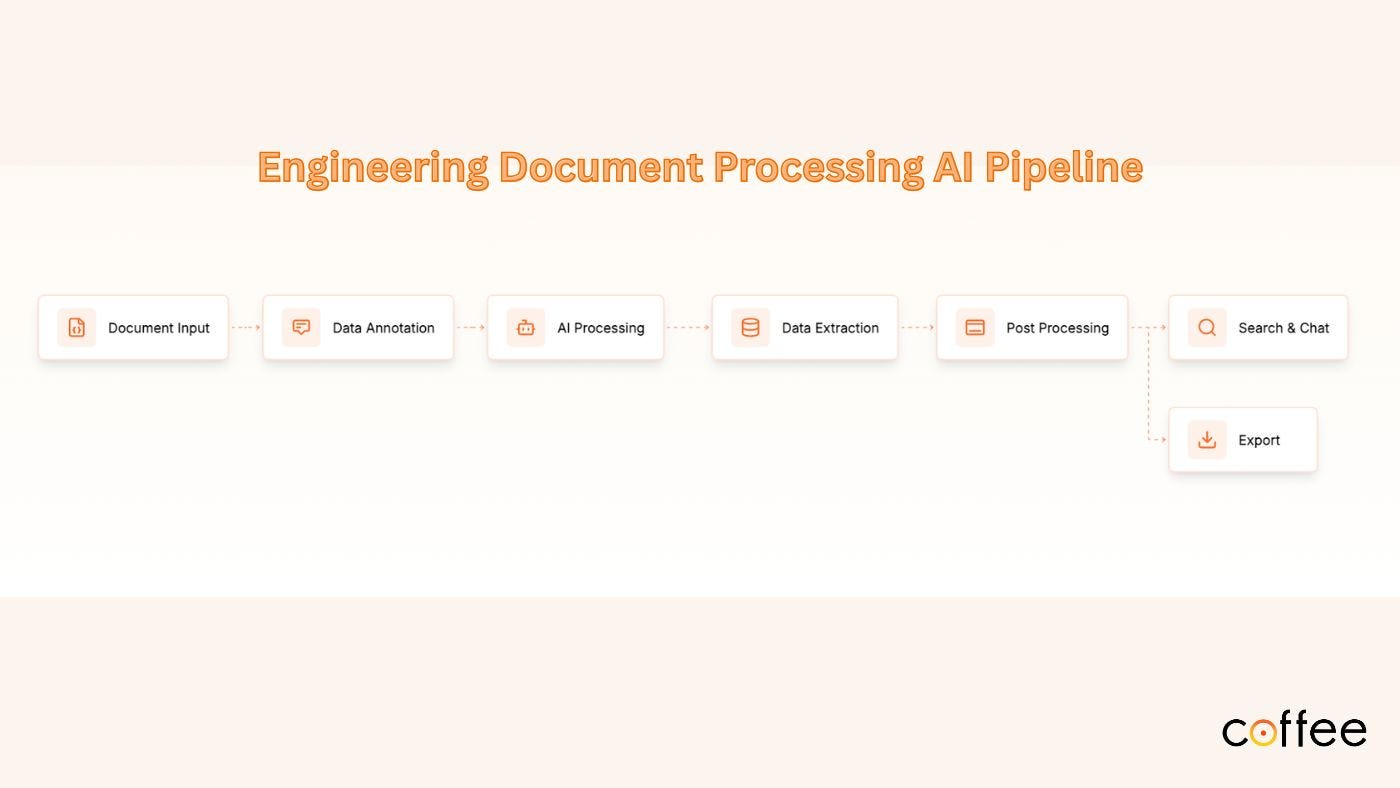
Recently, I found myself building an annotation module, which was a key part of the workflow pipeline for Adeos. And let me tell you, this project completely changed how I think about interface design.
Here’s the thing about annotations: they look very simple on the surface. User draws a rectangle, marks an area, done. Right? Or so I thought, until I digged deeper.
Underneath that simplicity is this whole ecosystem that has to transform static documents into responsive, interactive canvases. I actually had to dust off my math skills for this one, and honestly, I am glad I had “Everything You Need to Ace Math in One Big Fat Notebook” sitting in the office library.
Everything You Need to Ace Math in One Big Fat Notebook: The Ce School Study Guide…
This book isn’t about coding or programming concepts, it is simply a great resource that simplifies the math we learned in our school days, making those foundational concepts easier to understand and apply.
But here’s why I mention it: those basic concepts around coordinate geometry and transformations? They are very important when you are building systems like this.
In this article, I attempt to document the design patterns and system thinking that went into building an annotation system that actually feels natural and responsive. Because once you understand what’s happening under the hood, you realize that building great interactive interfaces is really about bridging the gap between human intuition and precise digital representation.
I. Foundation: The System Design
When building an annotation system, we are essentially creating a multi-layered interaction framework. The annotation system follows a clear separation of concerns through distinct layers:
- Presentation Layer (spatial representation): Handles visual rendering and immediate user feedback
- Interaction Layer (user interaction orchestration): Orchestrates user input and coordinate transformations
- State Management Layer (state persistence): Handles persistence and synchronization
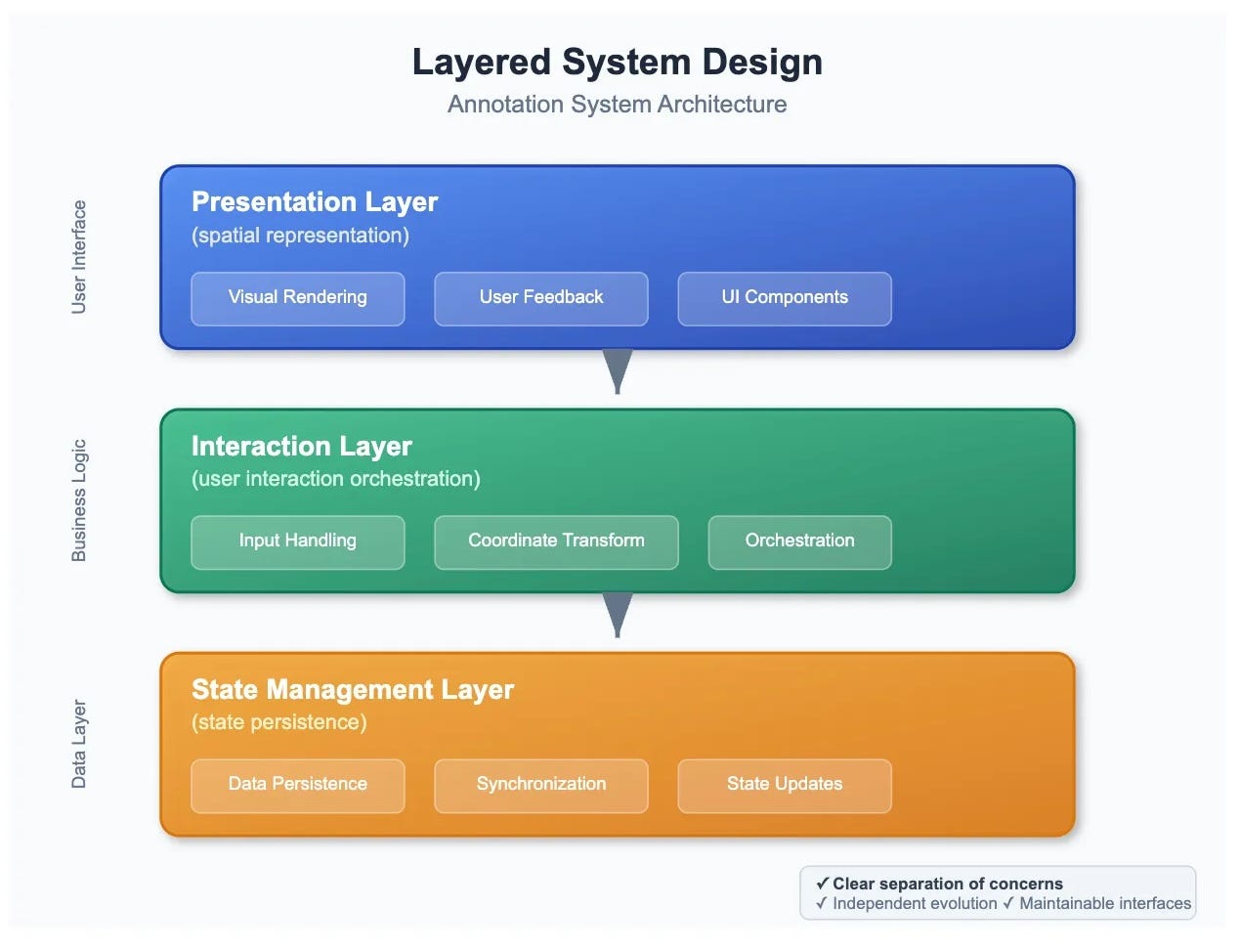
This layered approach allows each concern to evolve independently while maintaining clear interfaces between components.
The Core Data Model
The annotation data model serves as the foundation of our entire system. Rather than thinking of annotations as simple UI elements, we design them as spatial entities with behavioral contracts:
interface Annotation {
  id: string;                    // Identity layer
  type: AnnotationType;          // Behavioral classification
  bbox: [number, number, number, number]; // Spatial contract
  rotation?: number;             // Transformation state
  isSelected?: boolean;          // Interaction state
  isAdjusting?: boolean;         // Manipulation mode
}
This interface represents an annotation. every annotation must fulfill these spatial and behavioral requirements.
- The
bboxcoordinates establish our spatial coordinate system, - The
typedetermines the annotation’s behavioral characteristics and visual representation.
II. Coordinate System Design (The Math Behind it)
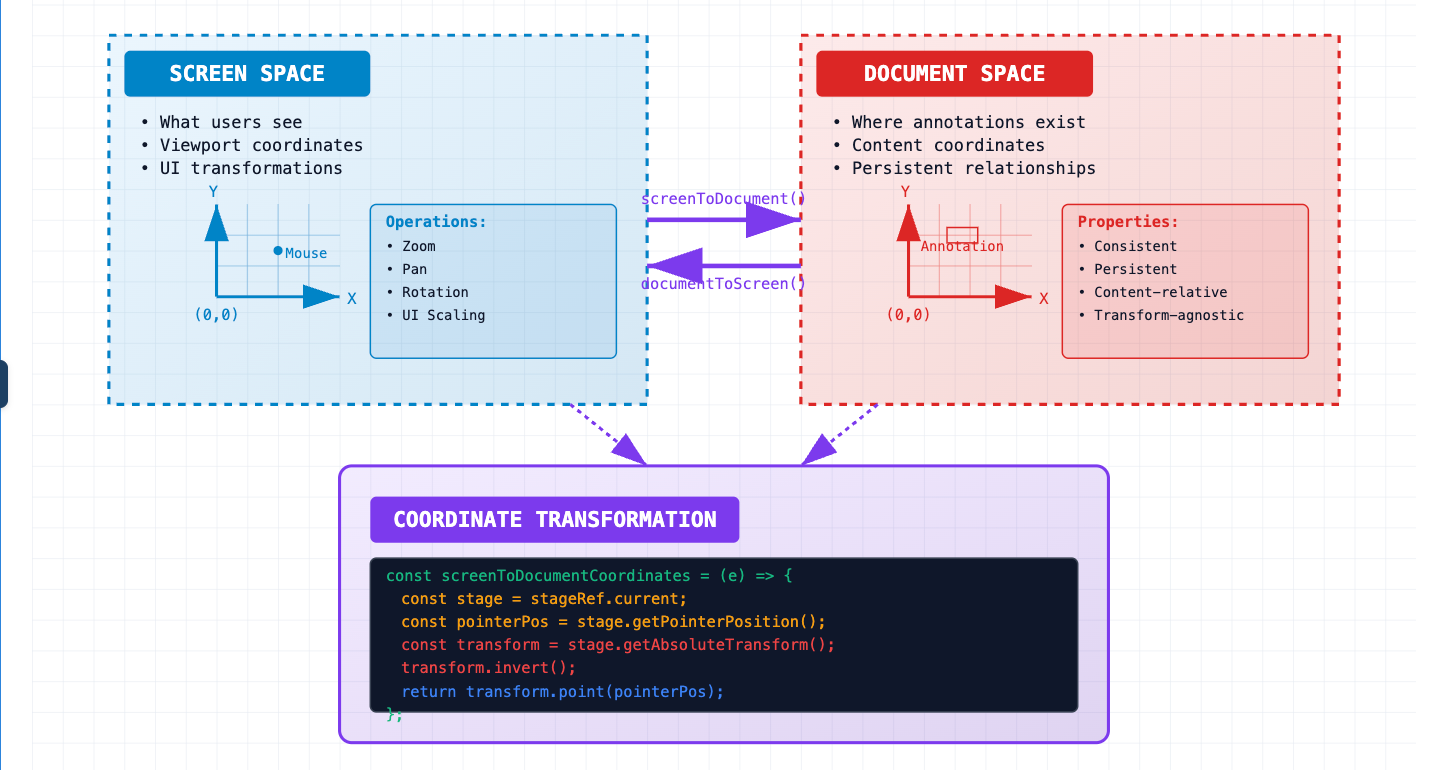
One of the most critical design decisions involves creating the coordinate transformation system. This isn’t just about converting mouse coordinates, but it is about establishing a mathematical framework that remains consistent across all system states.
Dual Coordinate System Design
We design our system around two distinct coordinate spaces:
- Screen Space (what users see) and
- Document Space (where annotations actually exist).
This design separation ensures annotations maintain their relationships to content regardless of user interface transformations. The transformation system handles zoom, pan, and rotation operations through a centralized coordinate transformation service:
const useCoordinateTransformation = (stageRef: RefObject<Konva.Stage>) => {
  const screenToDocumentCoordinates = useCallback((e: KonvaEventObject<MouseEvent>) => {
    const stage = stageRef.current;
    const pointerPos = stage.getPointerPosition();

    // Apply inverse transformation matrix
    const transform = stage.getAbsoluteTransform().copy();
    transform.invert();

    return transform.point(pointerPos);
  }, [stageRef]);

  return { screenToDocumentCoordinates };
};
This design pattern ensures that all coordinate-dependent operations remain consistent and predictable, regardless of viewport transformations.
III. Interaction System: Handling User Events
User interaction in annotation systems needs careful planning. Think of it like managing different modes in a drawing app:
- ready to draw,
- actively drawing, and
- finishing up.
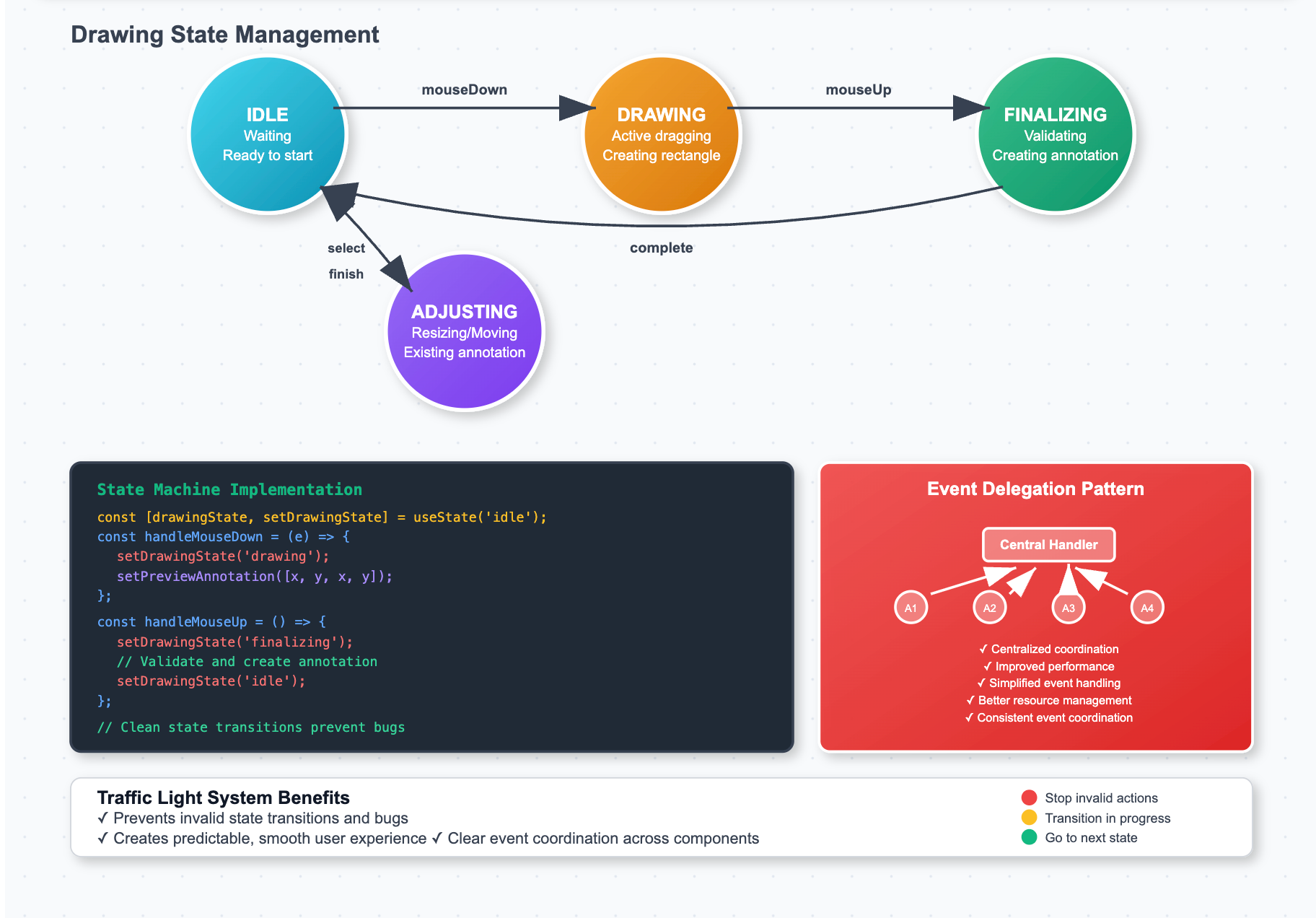
We organize this as a state machine that tracks what the user is currently doing.
Drawing State Management
The drawing process follows a simple but well-organized pattern with four clear states:
- Idle State: Just waiting. User hasn’t started drawing yet
- Drawing State: User is actively dragging to create a rectangle
- Finalizing State: User finished dragging, and we are checking if it’s valid
- Adjusting State: User is resizing or moving an existing annotation
Each state knows what can happen next and what actions are allowed. This prevents confusing situations and keeps the user experience smooth:
const useAnnotationDrawing = () => {
const [drawingState, setDrawingState] = useState('idle');
const [previewAnnotation, setPreviewAnnotation] = useState<number[] | null>(null);


const handleMouseDown = useCallback((e: KonvaEventObject<MouseEvent>) => {
    const documentPos = screenToDocumentCoordinates(e);
    // Transition to drawing state
    setDrawingState('drawing');
    setPreviewAnnotation([documentPos.x, documentPos.y, documentPos.x, documentPos.y]);
  }, []);

const handleMouseUp = useCallback(() => {
    if (drawingState !== 'drawing') return;

    // Transition to finalizing state
    setDrawingState('finalizing');

    const [x1, y1, x2, y2] = normalizeRectangle(previewAnnotation);

    if (Math.abs(x2 - x1) > MIN_ANNOTATION_SIZE) {
      createAnnotation({ bbox: [x1, y1, x2, y2] });
    }

    // Return to idle state
    setDrawingState('idle');
    setPreviewAnnotation(null);
  }, [drawingState, previewAnnotation]);
  return { drawingState, previewAnnotation, handleMouseDown, handleMouseUp };
};
Think of this like a traffic light system: each state knows exactly what comes next and prevents invalid transitions. When a user clicks, we move from “waiting” to “drawing.” When they release, we move to “finishing” and then back to “waiting.” This organized approach prevents bugs and creates predictable behavior.
Event Delegation Pattern
Rather than handling events at individual annotation components, we design a centralized event delegation system. This pattern improves performance and simplifies event coordination across multiple annotations.
IV. Visual System: Rendering and Performance Design
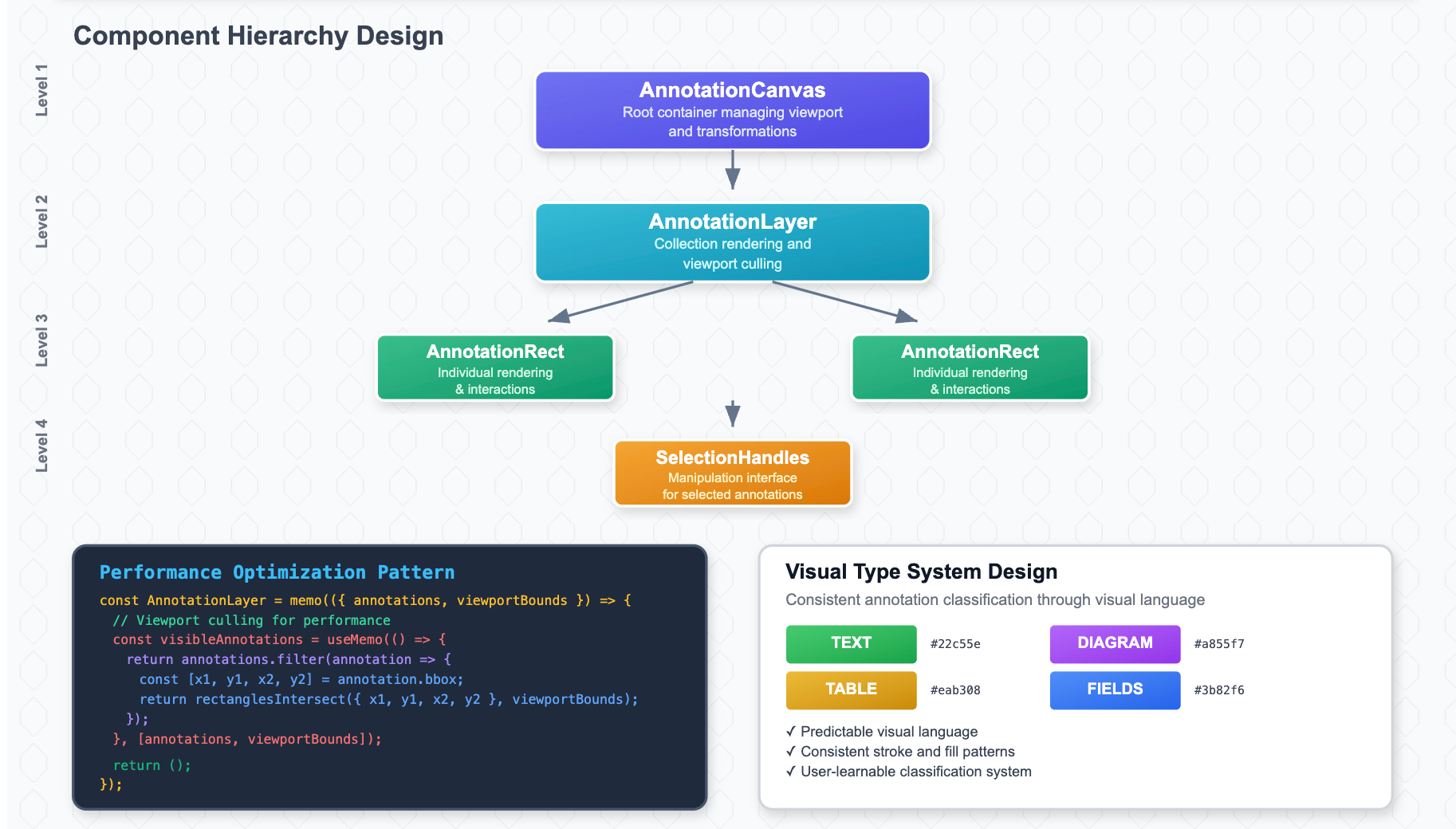
The visual system must handle potentially hundreds of annotations while maintaining smooth interaction. We solve this through a hierarchical rendering system with performance optimization patterns.
Component Hierarchy Design
The rendering system follows a clear hierarchy:
- AnnotationCanvas: Root container managing viewport and transformations
- AnnotationLayer: Handles annotation collection rendering and culling
- AnnotationRect: Individual annotation rendering and local interactions
- SelectionHandles: Manipulation interface for selected annotations
Each level has specific responsibilities and optimization strategies:
const AnnotationLayer = memo(({ annotations, viewportBounds }) => {
  // Design pattern: Viewport culling for performance
  const visibleAnnotations = useMemo(() => {
    return annotations.filter(annotation => {
      const [x1, y1, x2, y2] = annotation.bbox;
      return rectanglesIntersect({ x1, y1, x2, y2 }, viewportBounds);
    });
  }, [annotations, viewportBounds]);

return (
    <Group>
      {visibleAnnotations.map(annotation => (
        <AnnotationRect key={annotation.id} annotation={annotation} />
      ))}
    </Group>
  );
});
Visual Type System Design
We design a visual type system that provides consistent annotation classification. This isn’t just about colors — it’s about establishing a visual language that users can learn and predict:
const getAnnotationColors = (type: AnnotationType, isSelected: boolean = false) => {
  const typeSystemColors = {
    TEXT: { stroke: "#22c55e", fill: "rgba(34, 197, 94, 0.15)" },
    TABLE: { stroke: "#eab308", fill: "rgba(234, 179, 8, 0.15)" },
    DIAGRAM: { stroke: "#a855f7", fill: "rgba(168, 85, 247, 0.15)" },
    FIELDS: { stroke: "#3b82f6", fill: "rgba(59, 130, 246, 0.15)" }
  };

  return typeSystemColors[type];
};
This visual type system creates consistency across the entire annotation ecosystem.
V. State Management: The Data Flow Design
Effective annotation systems require sophisticated state management. We design this as a centralized store with clear data flow patterns and update strategies.
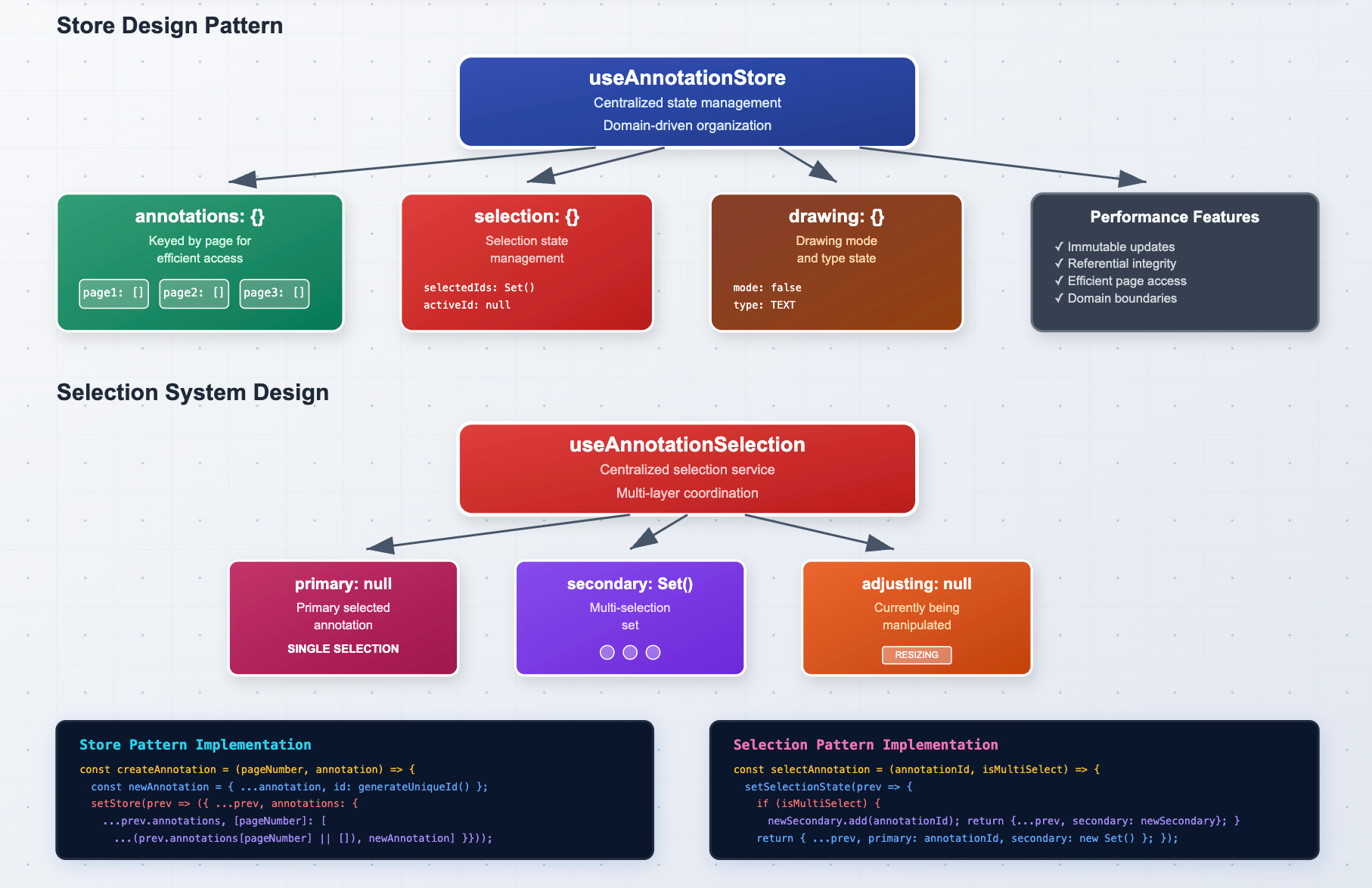
Store Design Pattern
The annotation store follows a domain-driven design where annotations are organized by their natural boundaries (pages) with efficient access patterns:
const useAnnotationStore = () => {
  const [store, setStore] = useState({
    annotations: {},  // Keyed by page for efficient access
    selection: { selectedIds: new Set(), activeId: null },
    drawing: { mode: false, type: AnnotationType.TEXT }
  });
// Design pattern: Immutable updates with referential integrity
  const createAnnotation = useCallback((pageNumber: number, annotation) => {
    const newAnnotation = { ...annotation, id: generateUniqueId() };

    setStore(prev => ({
      ...prev,
      annotations: {
        ...prev.annotations,
        [pageNumber]: [...(prev.annotations[pageNumber] || []), newAnnotation]
      }
    }));

    return newAnnotation.id;
  }, []);
  return { store, createAnnotation };
};
Selection System Design
Selection management requires careful design consideration because it affects multiple system layers. We design this as a centralized selection service that coordinates between visual feedback, interaction capabilities, and keyboard shortcuts:
const useAnnotationSelection = () => {
  const [selectionState, setSelectionState] = useState({
    primary: null,      // Primary selected annotation
    secondary: new Set(), // Multi-selection set
    adjusting: null     // Currently being manipulated
  });
const selectAnnotation = useCallback((annotationId: string, isMultiSelect = false) => {
    setSelectionState(prev => {
      if (isMultiSelect) {
        const newSecondary = new Set(prev.secondary);
        newSecondary.add(annotationId);
        return { ...prev, secondary: newSecondary };
      }

      return { ...prev, primary: annotationId, secondary: new Set() };
    });
  }, []);
  return { selectionState, selectAnnotation };
};
VI. Advanced Interaction Patterns
Professional annotation systems require advanced interaction patterns. We design these as composable behaviors that can be mixed and matched based on application requirements.
Manipulation Interface Design
The manipulation interface provides handles for resizing and moving annotations. This is designed as a separate concern that activates based on selection state:
const SelectionHandles = ({ rect, zoomLevel, onResize }) => {
  const handleSize = 8 / zoomLevel;  // Scale-invariant handle size

  const handlePositions = useMemo(() => [
    { x: rect.x - handleSize/2, y: rect.y - handleSize/2, cursor: 'nw-resize' },
    { x: rect.x + rect.width - handleSize/2, y: rect.y - handleSize/2, cursor: 'ne-resize' },
    { x: rect.x + rect.width - handleSize/2, y: rect.y + rect.height - handleSize/2, cursor: 'se-resize' },
    { x: rect.x - handleSize/2, y: rect.y + rect.height - handleSize/2, cursor: 'sw-resize' }
  ], [rect, handleSize]);

  return (
    <Group>
      {handlePositions.map((handle, index) => (
        <Rect
          key={index}
          {...handle}
          width={handleSize}
          height={handleSize}
          onMouseDown={(e) => startResize(e, index)}
        />
      ))}
    </Group>
  );
};
Keyboard Interaction System
We design keyboard interactions as a global service that coordinates with the selection system:
const useAnnotationKeyboardShortcuts = () => {
  const { selectionState, deleteAnnotation, duplicateAnnotation } = useAnnotationStore();

  useEffect(() => {
    const handleKeyDown = (e: KeyboardEvent) => {
      // Design guard: Don't interfere with form inputs
      if (e.target instanceof HTMLInputElement) return;

      const keyboardActions = {
        'Delete': () => deleteAnnotation(selectionState.primary),
        'Escape': () => clearSelection(),
        'd': (e) => e.ctrlKey && duplicateAnnotation(selectionState.primary)
      };

      const action = keyboardActions[e.key];
      if (action) {
        action(e);
        e.preventDefault();
      }
    };

    document.addEventListener('keydown', handleKeyDown);
    return () => document.removeEventListener('keydown', handleKeyDown);
  }, [selectionState]);
};
VII. Scaling Beyond
There are a few features that we are looking at currently for a better user experience. While they do not affect the core flow of the annotation system, these features allow for a much more seamless flow.
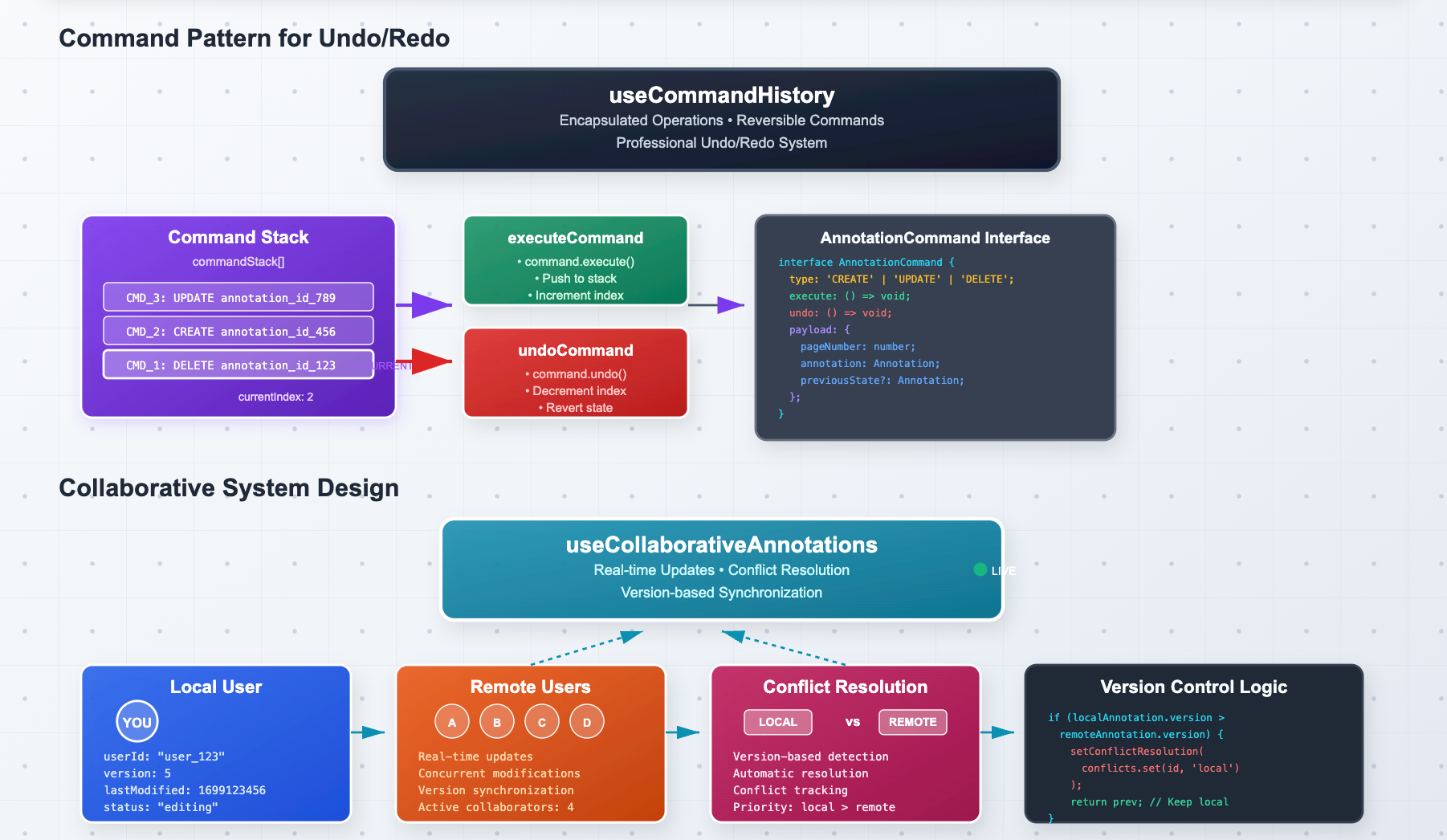
Undo/Redo
We design the undo/redo system using the Command pattern, which encapsulates each operation as a reversible command:
interface AnnotationCommand {
  type: 'CREATE' | 'UPDATE' | 'DELETE';
  execute: () => void;
  undo: () => void;
  payload: {
    pageNumber: number;
    annotation: Annotation;
    previousState?: Annotation;
  };
}
const useCommandHistory = () => {
  const [commandStack, setCommandStack] = useState<AnnotationCommand[]>([]);
  const [currentIndex, setCurrentIndex] = useState(-1);

  const executeCommand = useCallback((command: AnnotationCommand) => {
    command.execute();

    setCommandStack(prev => {
      const newStack = prev.slice(0, currentIndex + 1);
      return [...newStack, command];
    });

    setCurrentIndex(prev => prev + 1);
  }, [currentIndex]);

  const undoCommand = useCallback(() => {
    if (currentIndex >= 0) {
      commandStack[currentIndex].undo();
      setCurrentIndex(prev => prev - 1);
    }
  }, [commandStack, currentIndex]);

  return { executeCommand, undoCommand, canUndo: currentIndex >= 0 };
};
Collaborative System Design
For real-time collaboration, we design a conflict resolution system that handles concurrent modifications:
interface CollaborativeAnnotation extends Annotation {
  userId: string;
  lastModified: number;
  version: number;
}
const useCollaborativeAnnotations = () => {
  const [annotationStore, setAnnotationStore] = useState<Map<string, CollaborativeAnnotation>>(new Map());
  const [conflictResolution, setConflictResolution] = useState<Map<string, 'local' | 'remote'>>(new Map());

  const handleRemoteUpdate = useCallback((remoteAnnotation: CollaborativeAnnotation) => {
    setAnnotationStore(prev => {
      const localAnnotation = prev.get(remoteAnnotation.id);

      // Design decision: Version-based conflict detection
      if (localAnnotation && localAnnotation.version > remoteAnnotation.version) {
        setConflictResolution(conflicts =>
          conflicts.set(remoteAnnotation.id, 'local')
        );
        return prev; // Keep local version
      }

      return new Map(prev).set(remoteAnnotation.id, remoteAnnotation);
    });
  }, []);

  return { annotationStore, handleRemoteUpdate, conflictResolution };
};
Design Patterns and Best Practices
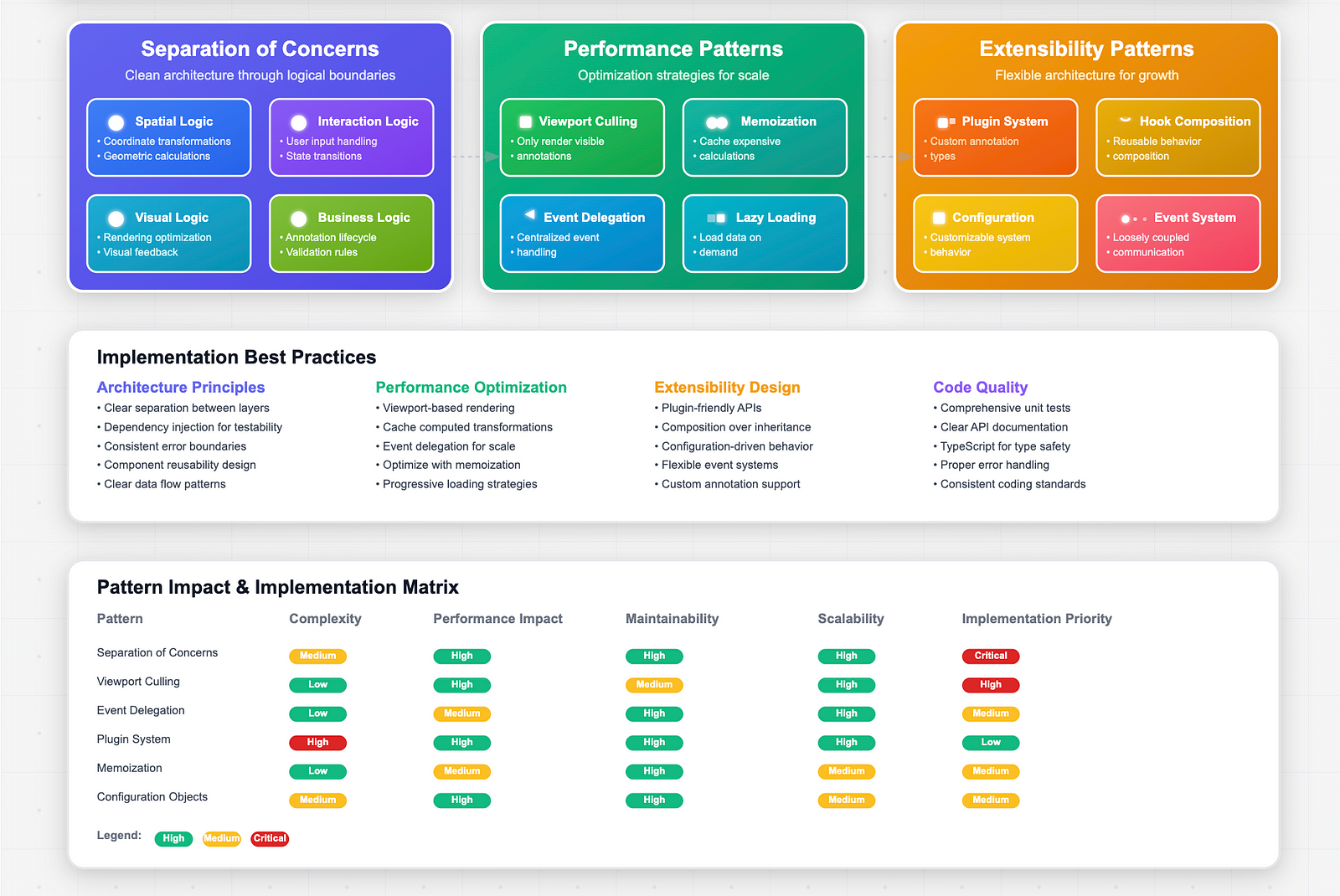
Through building annotation systems, several key design patterns emerge:
Separation of Concerns
- Spatial Logic: Coordinate transformations and geometric calculations
- Interaction Logic: User input handling and state transitions
- Visual Logic: Rendering optimization and visual feedback
- Business Logic: Annotation lifecycle and validation rules
Performance Patterns
- Viewport Handling: Only render visible annotations
- Memoization: Cache expensive calculations
- Event Delegation: Centralized event handling
- Lazy Loading: Load annotation data on demand
Extensibility Patterns
- Plugin System: Allow custom annotation types
- Hook Composition: Reusable behavior composition
- Configuration Objects: Customizable system behavior
- Event System: Loosely coupled component communication
Closing Thoughts
After months of building this annotation system, here’s what I have learned: Every single design decision I made directly impacted whether users felt like they were working with a precise, natural tool or fighting against a clunky interface. There is no middle ground with interactive systems like this.
The patterns I have shared here aren’t just for annotation systems. They’re the foundation for any interface where users need to manipulate spatial information, whether that’s a simple PDF markup tool or a complex collaborative design platform. The core insight that changed everything for me was realizing that annotations aren’t just UI components sitting on a page. They’re spatial entities with their own behavioral contracts and complex requirements that demand thoughtful system architecture.
So the next time you are using any kind of drawing or annotation tool, something like Canva, maybe you will think about all the design decisions happening in the background. And if you are building something similar, I hope these patterns will give you a solid foundation to work from.
Off to the next complexity, signing off, your friendly neighbourhood frontend dev, Vijay.
At Coffee, we are working on Adeos, a data extraction tool that can be used to extract key information from engineering drawings. If you are interested to learn more, reach out to us. This annotation editor is part of the Adeos workflow.