Read with Claude
 Read with ChatGPT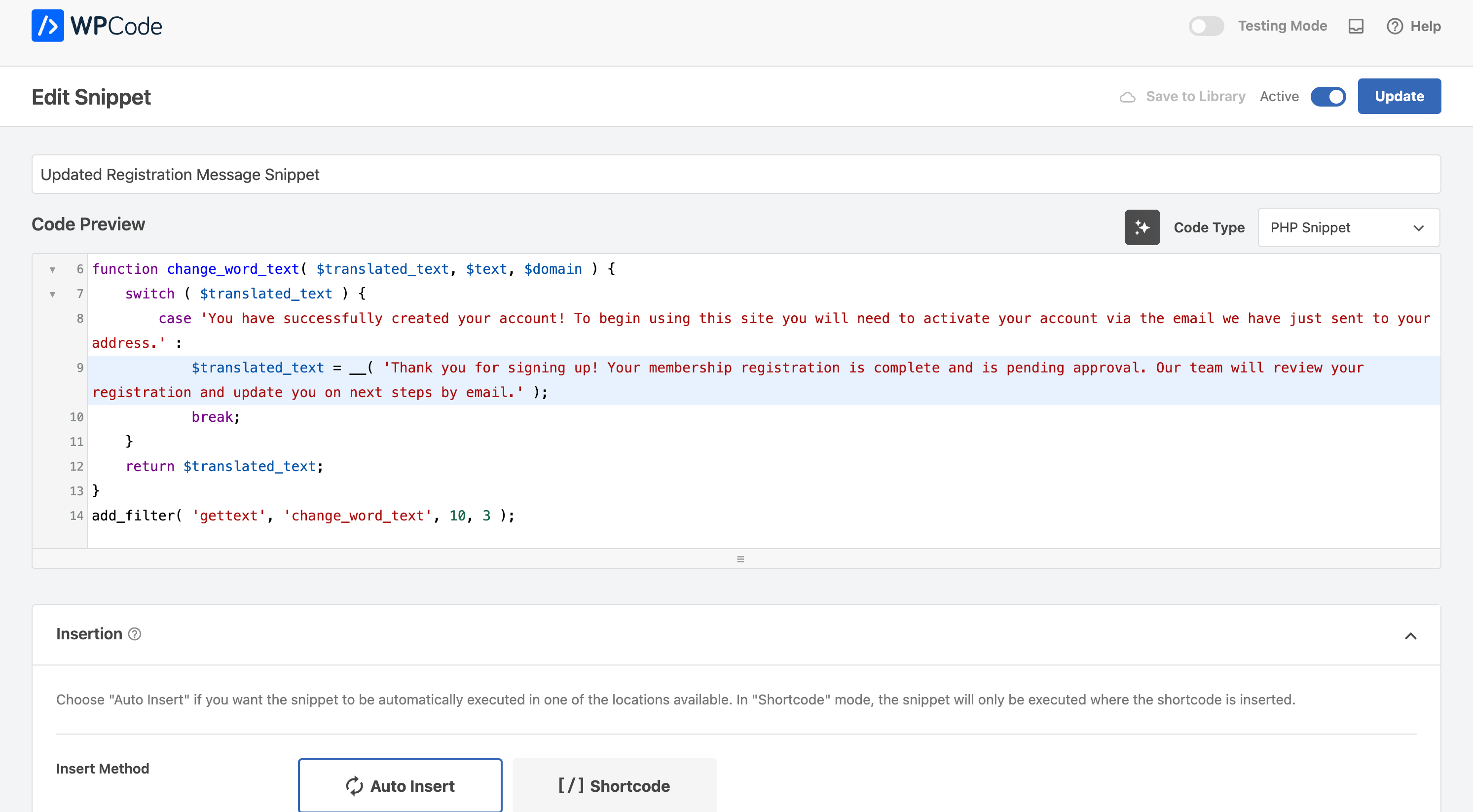
WordPress is highly customizable, and one of its most powerful features is the ability to create custom functions. These functions allow you to modify core behavior, enhance features, and optimize performance without altering core WordPress files.
Whether you’re modifying registration messages, customizing login screens, or enhancing user interactions, custom functions provide a way to directly modify functionality. Instead of relying on third-party plugins for small modifications, you can implement custom solutions suited to your exact needs.
Example Use Cases
Below are some practical applications of custom functions in WordPress:
1. Modifying Registration Message Texts
When a user registers, WordPress displays a default message. You may want to customize this to match your site’s branding or provide additional instructions. Using the gettext filter, you can modify this text dynamically.
function change_word_text( $translated_text, $text, $domain ) {
    if ( $translated_text === 'You have successfully created your account! To begin using this site you will need to activate your account via the email we have just sent to your address.' ) {
        $translated_text = __( 'Thank you for signing up! Your membership registration is pending approval. Our team shall review your registration and get back to you by email on next steps.');
    }
    return $translated_text;
}
add_filter( 'gettext', 'change_word_text', 10, 3 );
2. Adding Custom Login Messages
To personalize the login page, you can modify the default WordPress login message using login_message filter.
function custom_login_message( $message ) {
    if ( empty($message) ) {
        return '<p class="custom-message">Welcome to our website! Please log in to access your account.</p>';
    }
    return $message;
}
add_filter( 'login_message', 'custom_login_message' );
3. Redirect Users After Login
You may want to redirect users to a specific page after login based on their role.
function custom_login_redirect( $redirect_to, $request, $user ) {
    if ( isset($user->roles) && is_array($user->roles) ) {
        if ( in_array('administrator', $user->roles) ) {
            return admin_url();
        } else {
            return home_url('/dashboard/'); // your custom url
        }
    }
    return $redirect_to;
}
add_filter( 'login_redirect', 'custom_login_redirect', 10, 3 );
function custom_login_redirect( $redirect_to, $request, $user ) {
if ( isset($user->roles) && is_array($user->roles) ) {
if ( in_array('administrator', $user->roles) ) {
return admin_url();
} else {
return home_url('/dashboard/');
}
}
return $redirect_to;
}
add_filter( 'login_redirect', 'custom_login_redirect', 10, 3 );4. Automatically Set Default User Role
If you want all new users to be assigned a specific role upon registration, you can use the following function:
function set_default_user_role( $user_id ) {
    $user = new WP_User( $user_id );
    $user->set_role( 'subscriber' );
}
add_action( 'user_register', 'set_default_user_role' );
5. Disable Admin Bar for Non-Admins
To keep your site’s frontend clean, you might want to hide the WordPress admin bar for all users except administrators:
function disable_admin_bar_for_non_admins() {
    if ( ! current_user_can( 'administrator' ) && ! is_admin() ) {
        show_admin_bar( false );
    }
}
add_action( 'after_setup_theme', 'disable_admin_bar_for_non_admins' );
6. Remove WordPress Version Number
For security reasons, you might want to remove the WordPress version number from your site’s source code to prevent exposure to potential vulnerabilities:
function remove_wp_version() {
    return '';
}
add_filter( 'the_generator', 'remove_wp_version' );
Using WPCode to Add Custom Functions
Instead of modifying theme files directly, you can safely add custom functions using the WPCode plugin.
WPCode — Insert Headers and Footers + Custom Code Snippets — WordPress Code Manager
- Install WPCode: Go to
Plugins > Add New, search for "WPCode Lite", and install/activate it. - Add a New Snippet: Navigate to
Code Snippets > Add Snippet. - Choose “Add Your Custom Code (New Snippet)”.
- Paste the Code: Copy and paste your custom function into the editor.
- Select “Run Everywhere”: This ensures the snippet runs site-wide.
- Save & Activate: Click “Save Snippet” and then “Activate”.
Benefits of Using Custom Functions
- Customization without plugins: Avoid unnecessary plugins for small modifications.
- Improved site performance: Reduce plugin bloat and optimize speed.
- Easier maintenance: Organize and manage snippets in one place with WPCode.
- Enhanced security: Disable unnecessary features or hide sensitive information.
- Better user experience: Modify behavior based on user roles or preferences.
Conclusion
Custom functions are a powerful way to enhance and personalize your WordPress website. They enable you to fine-tune various aspects of your site, from modifying system messages to streamlining user interactions and enforcing security measures.
Whether you’re adjusting registration responses, creating role-based redirects, or optimizing backend performance, adding custom code snippets gives you the freedom to tailor WordPress to your exact needs. This approach not only improves flexibility and control but also minimizes reliance on third-party plugins, ensuring a more lightweight and efficient website.
Have you come across any interesting use-cases for custom functions?