Read with Claude
 Read with ChatGPT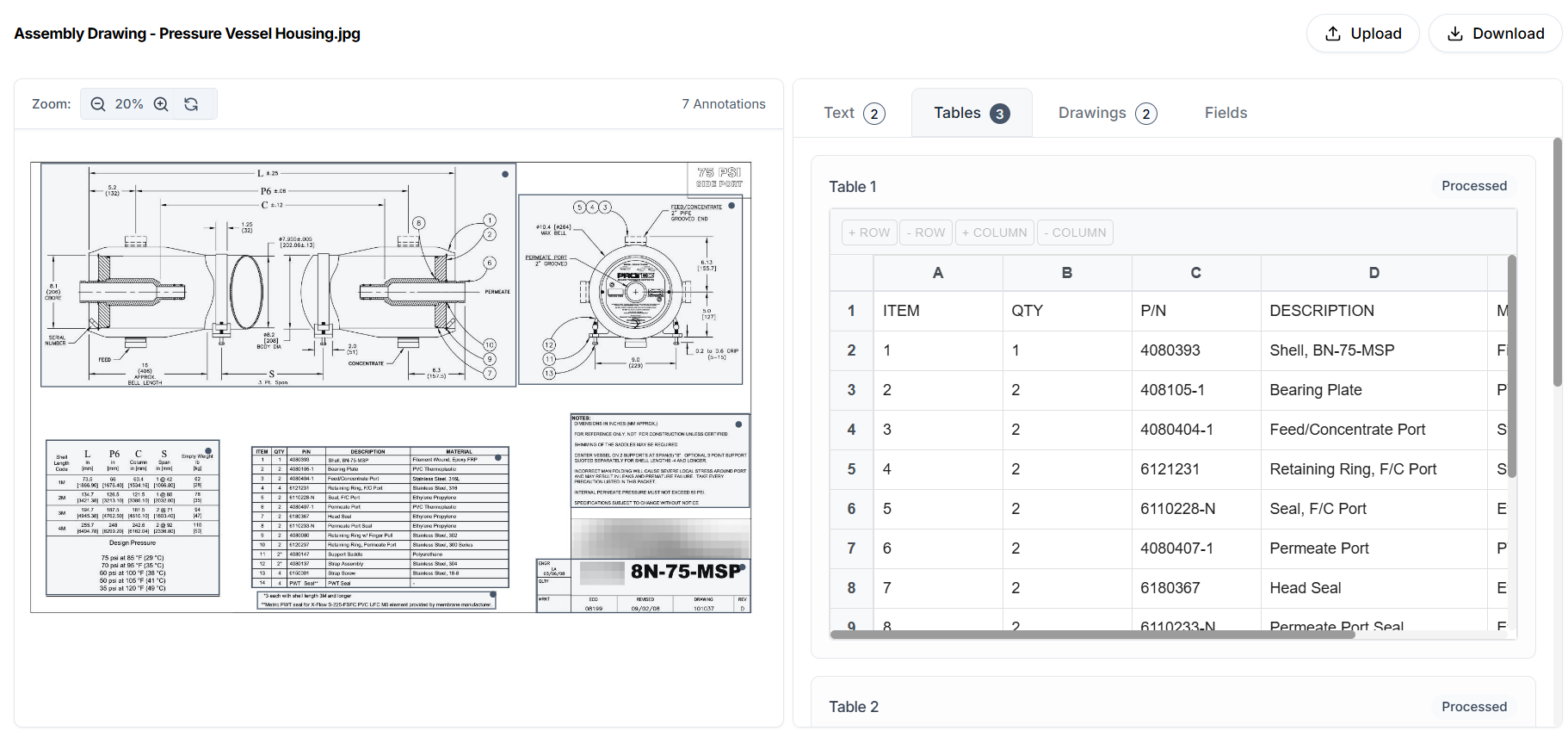
Most document extraction systems are built as pipelines. A fixed sequence of steps runs on every document: preprocess, detect layout, run OCR, extract fields, export data. This works when documents are clean, consistent, and predictable.
Engineering drawings are none of those. Tables span pages. Text is rotated or embedded inside graphics. Templates vary across vendors, standards, and time. The same information can appear in different places, formats, and naming conventions depending on who created the drawing.
Further, engineering document or drawing handled by multiple stakeholders of a project/product. The drawing is read by different level of people from shop floor to drawing room to stores.
In this environment, a static pipeline breaks down. It cannot adapt its behavior to the document in front of it. It cannot decide that one drawing needs extensive cleanup while another does not. It cannot resolve conflicts when layout detection overlaps, or reason about which table is the real bill of materials and which is just a reference. It simply executes steps, whether they make sense or not.
Adeos is designed around this limitation.
ADEOS — Document Intelligence Platform
When ML model needs to read and interpret, it requires different capabilities like us to process the information and interpret to others. Instead of a fixed pipeline, Adeos uses an agentic architecture.
How Adeos Works: The Agentic AI Architecture
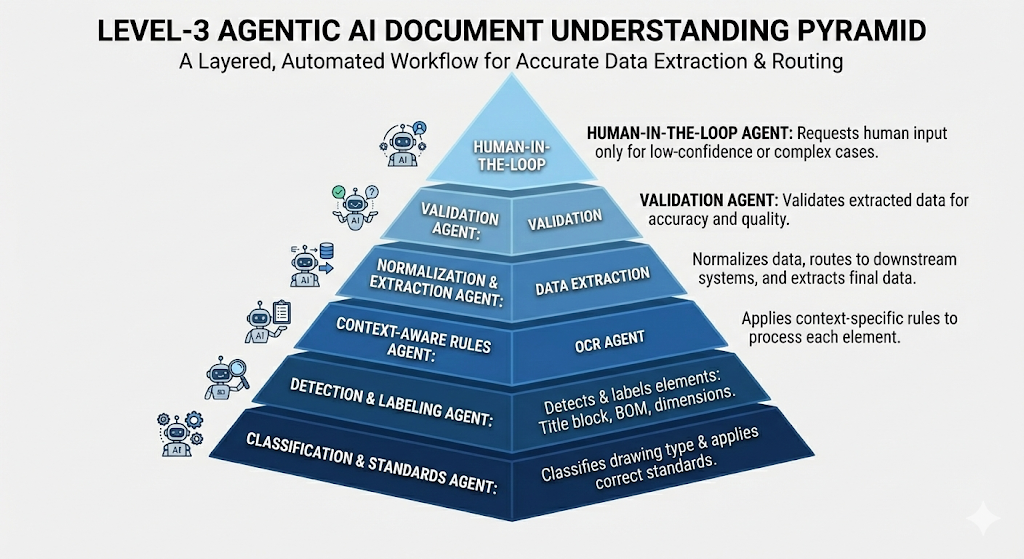
Adeos is composed of agents that perceive the document, reason about what they see, act to resolve problems, and learn from repeated patterns. Each agent has a narrow responsibility, the ability to make local decisions, and the ability to adapt its behavior based on document type, quality, and context.
→ Pre-Processing Agent
The pre-processing agent ensures document quality before extraction begins.
Perceive: Examine the document and identify quality issues: blur, high-density regions where elements crowd together, borderless tables, and broken tables.
Reason: Classify anomaly types and determine the correction sequence. If multiple quality issues exist, the agent prioritizes which corrections will have the greatest impact on downstream extraction accuracy.
Beyond OCR: Anomalies in Data Extraction from Engineering Drawings
Act: Apply computer vision techniques to improve quality. It enhances line and text clarity, smooths uneven lighting across the page, and rotates tilted pages to standard orientation.
Learn: Maintain memory of which anomalies occur frequently across different document types, which corrections prove effective, and which processing parameters work reliably. Over time, it predicts problems faster and applies the right corrections with less computation.
→ Layout Detection Agent
The layout detection agent identifies sections on the page and resolves conflicts when detected regions overlap.
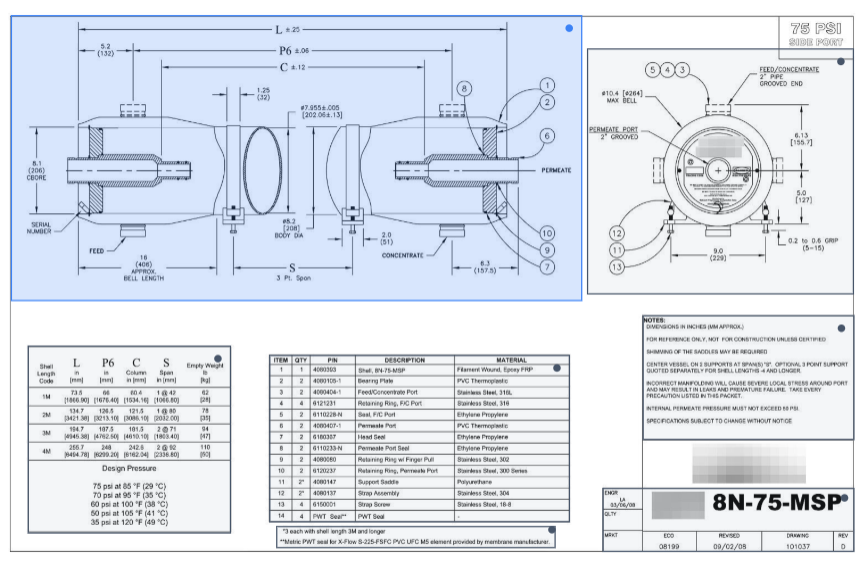
ADEOS- Layout Detection
Perceive: Preview the pre-processed document and identifies key sections: bill of materials table, technical drawing, title block, supplementary tables, and text annotations.
Reason: Identify boxes that overlap significantly, boxes completely inside other boxes, and duplicate boxes that detected the same region twice.
Act: Resolve overlaps using priority rules. Each section type has a priority: title block highest, then bill of materials, then drawing, then supplementary tables, then text.
Learn: Learn placement patterns for different section types across document templates. It learns which boxes frequently cause false overlaps and when the priority rules need adjustment for specific document types.
→ OCR Agent
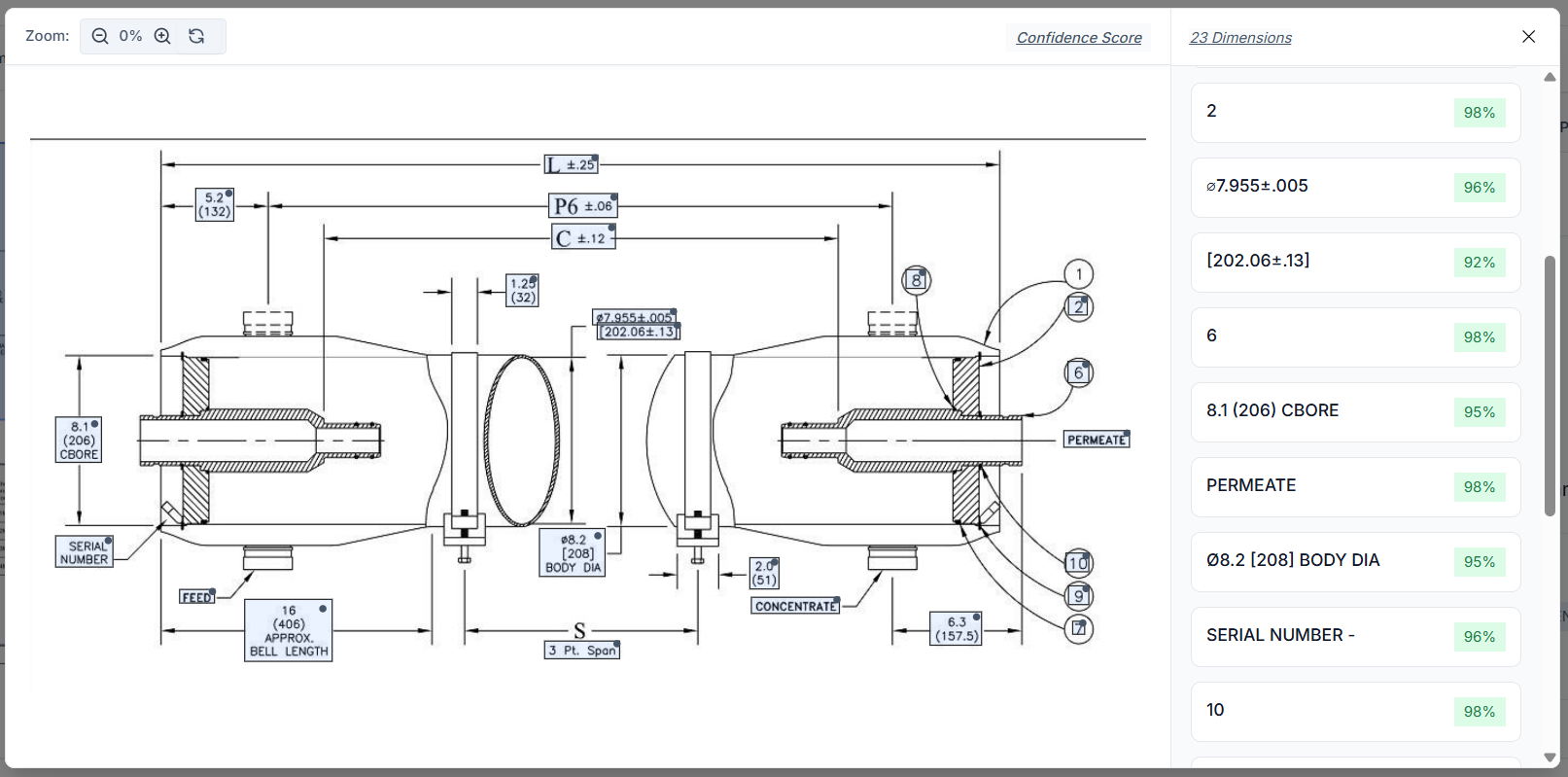
ADEOS — OCR
Perceive: Receive image regions from the layout detection agent and identify text elements within those regions.
Reason: Determine the appropriate OCR technique for each region. Printed text uses different recognition methods than handwritten annotations.
Act: Apply OCR techniques to extract text from identified regions. It reads part numbers from title blocks, extracts dimension values from callouts, captures material specifications from tables, and recognizes revision notes from annotation fields.
Learn: Learn which OCR models perform best for different text orientations and qualities.
→ Data Extraction Agent
The data extraction agent pulls structured data from the classified and segmented document regions.
Perceive: Receive classified sections with their bounding boxes and OCR text from previous agents. It examines table structures, text positioning, and the relationships between elements within each section.
Reason: Identify which data fields exist in each section based on the classification and layout. In a title block, it identifies which text corresponds to part numbers, which to material specifications, and which to revision levels.
Act: Extract data from each field and organizes it into structured records. Part numbers, descriptions, quantities, and materials from bill of materials tables become rows in a structured dataset.
Learn: Learn field positions and naming conventions across different document templates. It learns how companies organize their title blocks, how they structure their bill of materials tables, and how they present dimension information.
→ Validation Agent
The validation agent checks extracted data for consistency, completeness, and correctness.
Perceive: Receive all extracted data from the layout extraction agent. It examines relationships between fields, checks for required information, and looks for patterns that indicate potential errors.
Reason: Identify inconsistencies and missing information. If a part number appears in the title block but does not match any part number in the bill of materials, the agent flags this discrepancy.
Act: Generate validation reports that highlight potential issues. It assigns confidence scores to extracted data based on OCR quality, template match, and cross-reference consistency.
Learn: Learn which validation rules catch real errors versus false positives. It learns which cross-references are mandatory and which are optional for different drawing types.
→ Post-processing Agent
The post-processing agent formats validated data for export and integration with external systems.
Perceive: Receive validated, structured data from the validation agent along with metadata about the target export format or integration system. It examines the data structure requirements for the destination system (PLM, MES, ERP, or file formats like Excel, CSV, JSON, XML).
Reason: Determine how to map extracted fields to the target schema. It decides which transformations are needed to match the destination requirements.
Act: Transform the data into the target format. For API integrations, it makes the necessary calls to populate target systems directly.
Learn: Learn which field mappings work reliably, which data transformations are needed for different industries, and which export formats different users prefer.
Conclusion
Engineering document intelligence is not a data extraction problem. It is a decision problem.
Every drawing requires a series of small judgments. Is this table the bill of materials or just a reference? Is this rotated text a note or a dimension? Is this overlap a detection error or an intentional layout? Human engineers make these judgments implicitly. Traditional systems do not make them at all. Adeos is built to make these judgments explicit through its agentic workflow.
Adeos agents, working in sequence, deliver the speed necessary to process thousands of documents while maintaining the accuracy necessary for engineering data. Each agent operates with local context, resolves uncertainty where it appears, and improves over time as it sees more documents.
This is what allows the system to handle variation without breaking. The result is a system that behaves more like a careful junior engineer than a rigid algorithm. It adapts to the document in front of it, flags what it cannot confidently resolve, and produces structured outputs that are reliable enough to be used in existing systems without constant manual correction.
If you are interested in Adeos, the Agentic Document Extraction tool that can be used to extract key information from engineering drawings, reach out to us at coffee@coffeeinc.in. We can deploy these agents for your use-cases.