Read with Claude
 Read with ChatGPT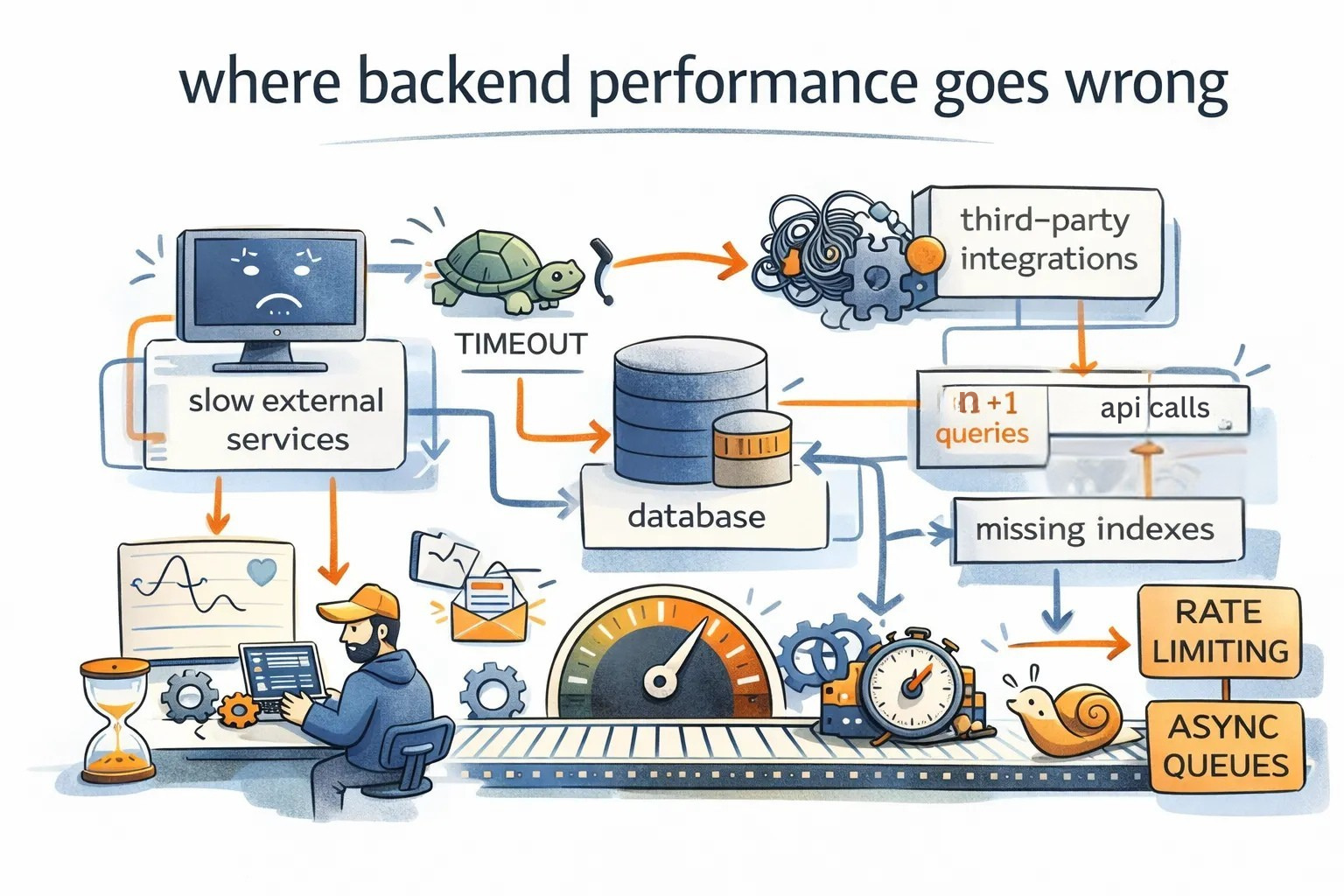
most people expect web apps to respond instantly. even small delays change how users feel. attention drops. frustration grows. trust in the system weakens.
where backend fails
that is why backend performance matters. the backend controls how fast data moves, how long requests wait, and how smooth the experience feels. a slow backend makes even a well-designed interface feel broken.
whether you are building a new system or improving an existing one, here are some common causes of slowness and how to address them.
1. third-party integrations
since we don’t create software from scratch, we use existing libraries, packages, and frameworks in our platforms to help with our app functionalities.
the mistake is choosing packages only based on features. you also need to consider size, maintenance, and performance.
for example, you might need to resize and compress images.
- option a: a library that supports every format, filters, and transformations, but adds 40 mb to your container and uses a lot of memory.
- option b: a simpler library that only resizes and compresses, adds 4 mb, and is actively maintained.
if your use case is only resizing profile images, option b is the better choice. less memory, smaller builds, faster cold starts.
another example is logging. a logging package that supports cloud sync, dashboards, alerts, and metrics may look attractive. but if you only need file logs and console output, that extra machinery slows every request. a minimal logger often performs better and is easier to maintain.
2. database
inefficient queries are the silent killers of performance in applications.
every idea for logic or query writing starts with: “am i implementing the operation correctly?” (getting the right response and modifications). but above this, we need to add one more layer immediately, once that is done: “how efficient is it?”
to keep the data flowing fast, we need to minimise operations. consider the following techniques:
the n+1 problem
it happens when we fetch a list of items from database and then loop through them to fetch related data for each item. simply put, it’s like going to the grocery store separately for every single egg you need. instead, use eager loading or joins to grab everything in one trip.
indexing
searching for a specific chapter without an index would require more time. that is exactly what your database does when you don’t index your columns. proper indexing is the map your database needs to find data instantly.
selective fetching
stop selecting ALL. if you only need a user’s name, don’t fetch their entire bio, address, and profile history. minimise the data payload to exactly what you need for that specific scenario.
connection pooling
opening and closing database connections is expensive. use a connection pool so requests reuse connections instead of creating new ones.
this reduces latency and lowers pressure on the database.
caching
sometimes the fastest operation is no operation. if the same data is requested again and again, cache it.
examples:
- user profiles and settings
- feature flags
- expensive reports
- dashboards
use in-memory caches like redis or memcached, http caching for public responses, and simple in-process caching where appropriate.
3. fire and forgot
in our minds, we starts plan out the flow sequentially, one component after another. but in execution, that is not necessarily the case.
assume you are in a restaurant**.** you ordered a main dish and started eating. later, you felt you needed a side dish, so you ordered it. you wouldn’t pause eating your main dish just to wait for the side dish to arrive. you know you don’t need it to finish your current bite.
find the functions and code blocks in your scripts that do not give any immediate benefit to the user. the flow of the application shouldn’t have to await for these functions to complete. queues and background tasks are very helpful for this scenario.
for example, when a user signs up,
bad:
create_user()
send_welcome_email()
return response
good:
create_user()
enqueue_email_job()
return response
the user sees success immediately while the email is sent in the background.
the same applies to analytics events. page views and button clicks should be queued and processed later instead of slowing down the main request.
4. blocking functions
every synchronous function call (where the program pauses at that line until the function completes) affects the throughput incredibly, especially in applications used by multiple users. it makes the entire system slow down horribly.
to fix this, we need to find and remove these bottlenecks,
go async
get rid of blocking snippets throughout the code base by turning them into asynchronous function calls (where the program kicks off the work and immediately moves on to the next line).
use worker threads
not every piece of code can be converted into asynchronous; some might be cpu-bound executions or third-party libraries without async functionality.
for such components, execute them in a separate thread (offloading the heavy lifting to a different cpu core) rather than the main web server thread. this makes the main application thread keep running without waiting, thus solving the blocking problem.
5. slow external services
even if your own system is fast, a slow dependency can make you slow.
protect yourself with:
- timeouts
- circuit breakers
- fallbacks
if a service is slow, return a partial response instead of blocking the whole request.
6. rate limiting
without limits, one noisy client or one bug can overwhelm the system.
rate limiting protects the backend and keeps performance stable under load.
backpressure ensures the system degrades gracefully instead of collapsing.
7. observability
you cannot fix what you cannot see.
add:
- structured logs
- request tracing
- latency and error metrics
this helps you find real bottlenecks instead of guessing.
conclusion
backend optimization is not just about saving milliseconds off a request to the server. it is about empathy for the users, respecting their time and attention.
a fast system feels calm and reliable. a slow system creates friction and doubt.
performance problems rarely show up in small tests. they show up when real users arrive, when traffic spikes, when data grows, and when systems age.
use tracing and profiling tools to understand where time is actually being spent. optimize the slow parts, not the loud ones.
if you treat performance as part of product quality instead of a technical afterthought, both your system and your users benefit.
at Coffee, we are engineering ai and systems that scale. if you are looking to build your next product or upgrade your existing toolset, reach out to us at coffee@coffeeinc.in.