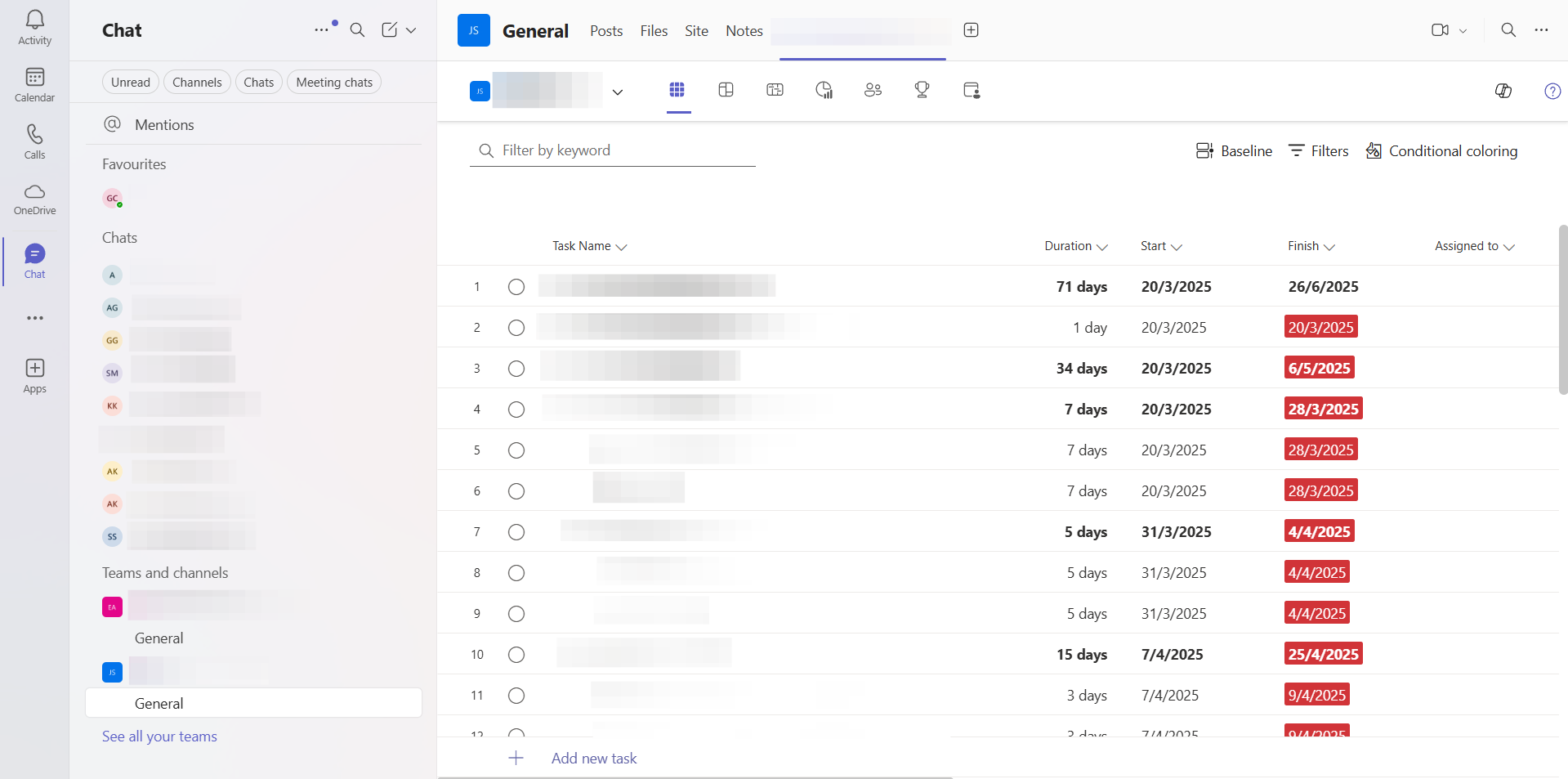
We help unify project tasks, document access, and team communication into one connected system across departments using Microsoft 365.

The primary objective was to transform a fragmented operation into a unified, secure project environment using the company's existing Microsoft 365 ecosystem. With six departments—Mechanical, Civil, Electrical, C&I, Procurement, and Project Management—suffering from informal communication and uncontrolled document access, the goal was to centralize all workflows.
Success was defined by three key metrics: implementation of full task dependency tracking across departments using Microsoft Planner, the establishment of role-based document governance in SharePoint, and the consolidation of all project-related communication into Microsoft Teams to ensure data integrity and transparency.
Projects involved multiple departments, each with its own tasks, timelines, and files, but no system connected any of it. Work was tracked informally, documents had no consistent home, and there were no rules about who could access what. External sharing was uncontrolled and sometimes exposed unintended project files to clients.
Teams shared updates across WhatsApp, email, and phone calls with no central record. Task dependencies were not formally tracked, so teams discovered blockers only when they started work.
All staff had full access to all files across every SharePoint site. Documents were stored in multiple folder locations, making them difficult to find, and there was no separation between departments or projects.
Department heads, team members, and external parties all had the same level of access. There was no structure for who could see or change what, making it impossible to govern work or protect sensitive project information.
Using a live project as a blueprint and collecting feedback before configuration meant the setup reflected real working patterns. Each phase moved from discovery to configuration to integration to handover.
A live project was used to map how tasks were assigned, how departments depended on each other, and how documents were organised across the project lifecycle. Feedback from department heads and the project management lead shaped the role structure, folder hierarchy, and permission levels before any configuration began.
Microsoft Planner was configured with department buckets, task dependencies, working calendar settings, and tiered license assignments. SharePoint was set up in parallel with the matching project folder hierarchy, department groups, and permission levels. Both tools were configured together to reflect the start-to-finish flow of a single project.
Planner was connected to Teams so task conversations synced across both tools. SharePoint was linked to Planner for document attachment. A live project was used to validate the full setup, confirming that tasks, documents, communication, and permissions all worked as expected across departments.
SOPs were delivered covering how to create a new project in Planner and SharePoint, configure dependencies, manage document permissions, grant guest access, and add new team members. Walkthroughs were conducted with all department heads and the project management lead.
The implementation was built by connecting the department heads and project management lead with the project lifecycle. Each project was set up in Planner and SharePoint together from the start, with the same structure applied every time. Roles, access levels, task dependencies, document storage, and external sharing were all part of one connected flow rather than separate systems running in parallel.
Every project was created as a plan in Planner with tasks, subtasks, owners, due dates, and department buckets. At the same time, a matching project folder was created in SharePoint with a Core Team folder and four department subfolders. Both were set up together at the start of each project.
Three access levels were applied across every project folder: Core Team with full edit access, department members with read and write access to their own subfolder and read-only access to others, and external parties with guest access set with an expiration date and password. Reusable department groups were created once and assigned to new projects without individual user assignments.
Department heads were given full access to dependency tracking, timeline views, workload reports, and task history. The wider team used the access covering their own tasks, due dates, and conversations. Task-related documents were attached within the Planner task.
Planner was connected to Teams so task conversations were reflected in the linked Teams channel and replies appeared back in Planner. All discussion stayed with the relevant task regardless of which tool the team member used.
Client sharing used SharePoint's site visitor role with an expiration date and password. Default access was restricted to within the organisation, so external sharing required an explicit action each time.
The company moved from scattered updates, uncontrolled access, and informal processes to one connected Microsoft 365 environment where tasks, documents, and communication all follow a defined structure. Project leads no longer gather status updates manually. Documents are organised and protected. External sharing is deliberate and time-bound.
Tasks across departments tracked in one system with clear ownership, due dates, and dependencies
Task conversations in Planner and Teams are linked, keeping all communication with the relevant task
Every project in SharePoint follows the same folder structure, making files easy to find
Each department edits only its own files and has read access to others
Guest access is controlled, time-bound, and restricted to the files intended for each external party
External sharing no longer exposes unintended project files to clients
Reusable project template in place so future projects follow the same structure from day one
SOPs delivered for task management, document permissions, guest access, and adding new projects
Structure and role clarity are what make a connected system work. Without them, adding more tools does not solve the problem. With them, the tools the organisation already has are enough.
Establishing the six departments and three access levels at the start meant every configuration decision had a clear answer. Tasks, permissions, and document folders all mapped to the same role structure.
Using a real project to map the workflow before configuring anything meant the final setup matched actual working patterns. Feedback from department heads at this stage prevented changes after deployment.
Department groups created once apply to every new project. This makes onboarding and project setup significantly faster and removes the risk of permission errors from manual assignments.
The transformation of a fragmented project environment into a unified Microsoft 365 ecosystem allowed this EPC firm to coordinate their teams across multiple departments with absolute structural clarity. By linking task governance in Planner with role-based access controls in SharePoint, the client established a secure, auditable source of truth for all project data. This connected workspace ensures that every task, document, and conversation is precisely where it belongs, enabling engineering teams to focus on delivery instead of searching for information.
Structure tasks, documents, roles, and communication using tools your team already has.

Replacing manual drawing review across departments with automated extraction and formula-driven calculations for supercritical boiler fabrication.

Extracting dimensions with abbreviations filtering and confidence-scored outputs from engineering drawings at scale.

A unified platform for generating and managing encryption keys across products, geographies, and customers.