Read with Claude
 Read with ChatGPT
Next.js 15.2 brings a host of exciting new features and improvements that I am excited for, helping optimize my experience during development, and the overall performance in building apps.
Next.js 15.2 is out now!
From stable React 19 support to smarter debugging, streaming metadata for faster initial loads, and the powerful new after() function, this release pushes the framework forward. Whether building complex apps or fine-tuning performance, Next.js 15 offers tools and updates designed to make our development smoother and more efficient. Here’s a breakdown of what’s new and why it matters.
1. React 19 Stable Support
Next.js continues its React 19 stable support in version 15.2, building on what was introduced in 15.1 . The App Router maintains its use of React Canary, which includes React 19 features along with experimental updates. While Next.js is pushing App Router as the future direction of the framework, the Pages Router remains fully supported across these version updates.
2. Error Debugging
Debugging has undergone a complete transformation in Next.js 15, addressing one of development’s most persistent pain points. The Vercel team has delivered substantial improvements to both terminal and browser error experiences, making troubleshooting more intuitive and efficient.
Terminal Output: Clarity at Last
The terminal experience in Next.js 15 eliminates the confusion of traditional error messages:
- Developer-First Formatting: Errors now highlight your code directly, not framework internals
- Focused Stack Traces: Third-party noise is filtered out automatically
- Runtime Consistency: Identical error formatting across standard and Edge environments
Before:
⨯ Error: boom at eval (./app/page.tsx:12:15)
    at Page (./app/page.tsx:11:74)
    at AsyncLocalStorage.run (node:async_hooks:346:14)
    at stringify (<anonymous>) ... and more confusing lines
After:
⨯ Error: boom at eval (app/page.tsx:6:10)
    at Page (app/page.tsx:5:32)
Browser Errors: Intelligent and Interactive
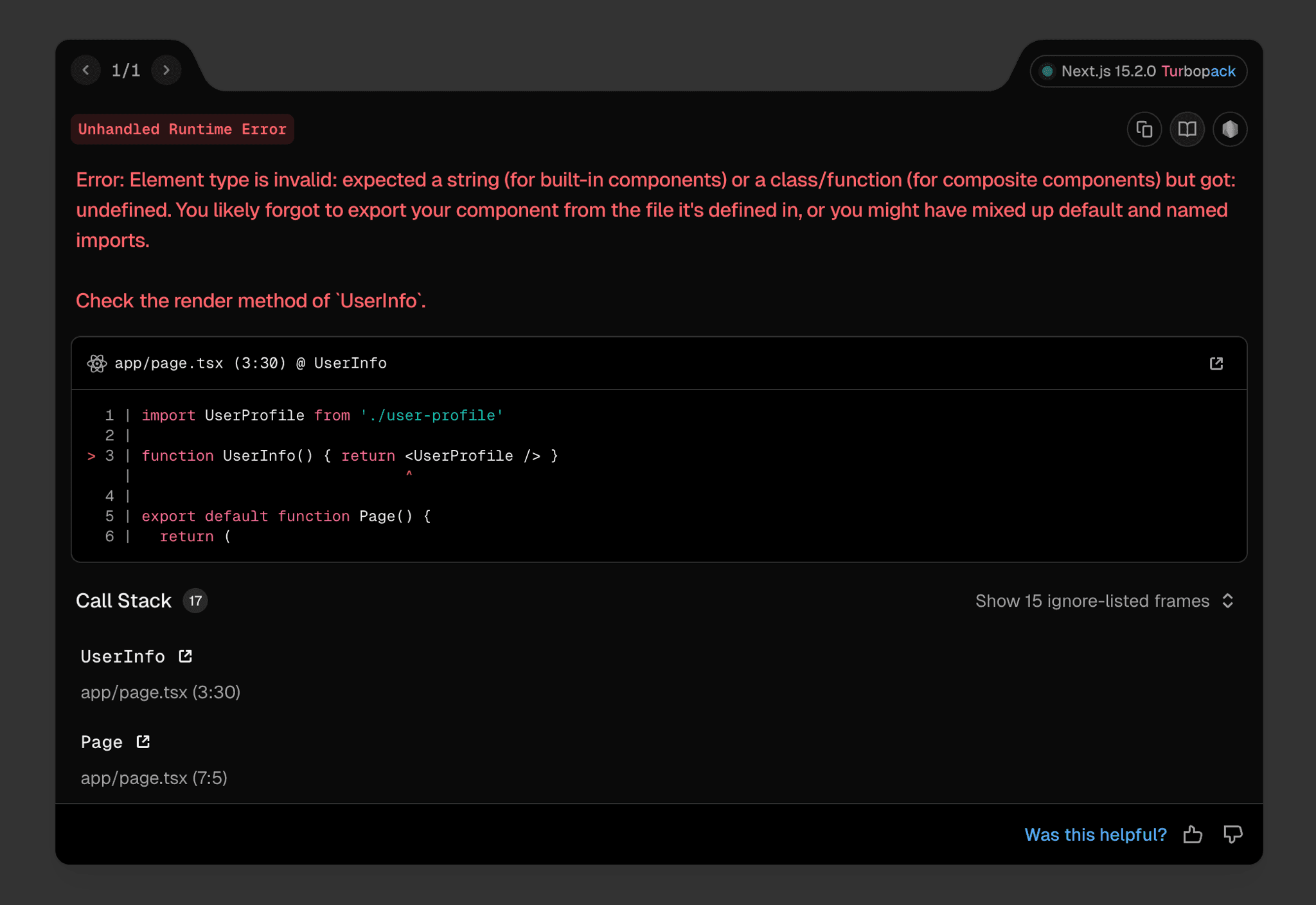
The browser error interface has been completely redesigned with practical features:
- Component-Level Precision: React “owner stacks” technology pinpoints exact error sources
- Personalized Experience: Customize error overlay behavior directly from the interface
- Feedback Mechanism: Rate error messages to contribute to ongoing improvements
- Dynamic Development Indicator: Subtle status indicator shows rendering mode and build status in real-time
These improvements transform debugging from an exercise in frustration to an almost seamless part of the development workflow. But let’s be honest — if you’re caught in the vibe coding zone only to crash into an endless loop of error messages, or if you’re burning through AI token quotas just to decipher cryptic stack traces, all you really need is errors that speak human. Next.js 15 finally delivers that clarity, letting you get back to what matters: building cool stuff instead of playing detective with your console.
3. Streaming Metadata for Faster Initial UI
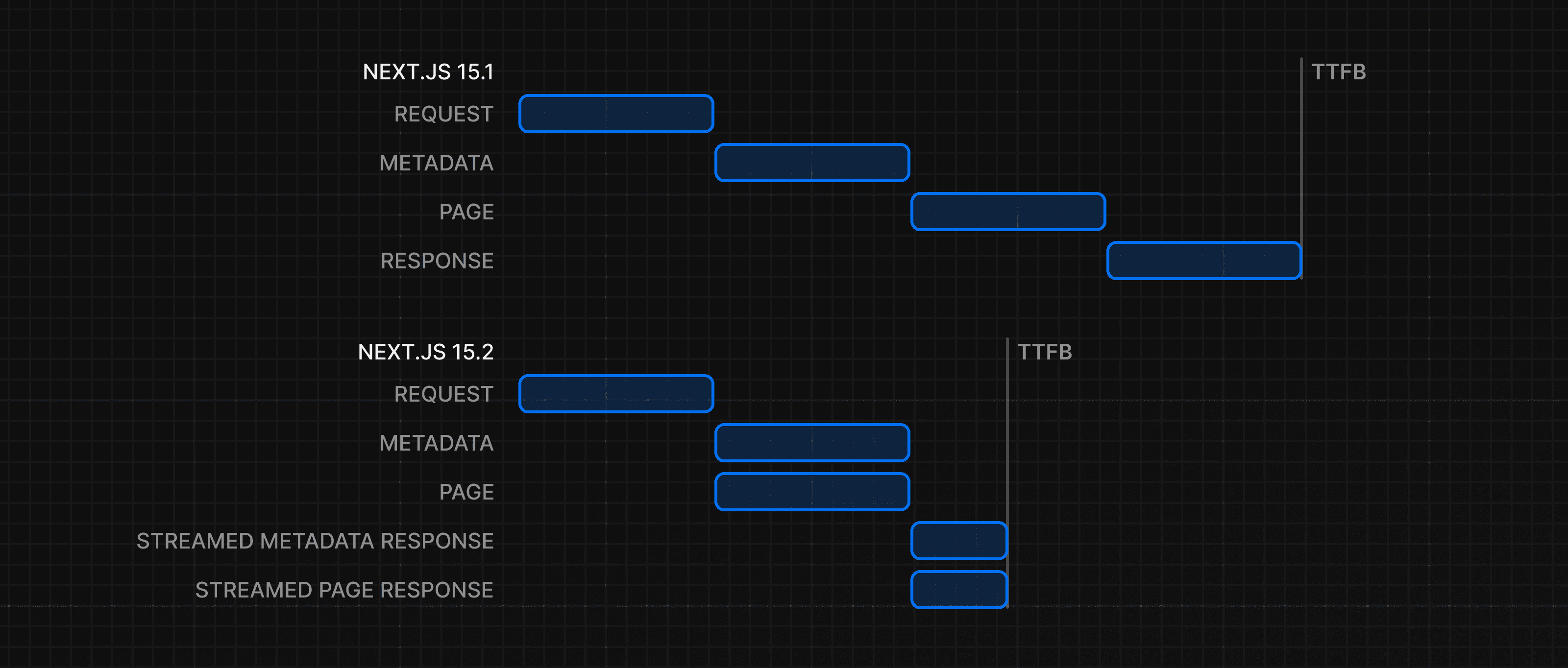
Next.js 15.2 introduces a significant performance upgrade with streaming metadata, tackling a common bottleneck in the development process. Previously, generateMetadata had to complete before the initial UI would be sent to the browser, creating a frustrating wait for users even when visual content was ready to display.
Why This Matters
The metadata bottleneck created a hidden tax on user experience:
- Pages with fast-loading UI components were still held hostage by metadata operations
- Data fetching that only affected SEO elements would delay visible content for actual users
- Developers faced an unnecessary tradeoff between SEO completeness and initial load performance
How It Works
With streaming metadata, Next.js now intelligently:
- Sends the initial UI to browsers while
generateMetadatais still processing - Maintains SEO compatibility by detecting bots and serving them complete metadata
- Offers granular control through the new
htmlLimitedBotsconfiguration option
Example Configuration:
// next.config.js
module.exports = {
  experimental: {
    htmlLimitedBots: /Googlebot|bingbot|custom-crawler/i, // Customize bot detection
  },
}
This smart approach gives you the best of both worlds — human visitors get lightning-fast initial renders while search engines receive the complete metadata they need for proper indexing. No more watching spinners while waiting for metadata operations that don’t impact what users actually see on screen.
4. after() Function for Post-Response Execution
The after function schedules tasks after a response (or prerender) is completed. It helps with logging, analytics, and other side effects without blocking the response.
Where Can You Use It?
- Server Components (including generateMetadata)
- Server Actions
- Route Handlers
- Middleware
Key Features:
- Does not block the response (unlike await).
- Runs even if an error occurs (notFound(), redirect()).
- Does not make a route dynamic (static pages remain static).
- Supports nesting inside other after calls.
Example 1: Using after in Layout for Logging Runs after the page is rendered and sent to the user.
import { after } from 'next/server'
import { log } from '@/app/utils'

export default function Layout({ children }: { children: React.ReactNode }) {
  after(() => {
    log() // Executes after rendering
  })
  return <>{children}</>
}
Example 2: Using after in an API Route for Logging User Activity Runs after a POST request completes.
import { after } from 'next/server'
import { cookies, headers } from 'next/headers'
import { logUserAction } from '@/app/utils'

export async function POST(request: Request) {
  after(async () => {
    const userAgent = (await headers().get('user-agent')) || 'unknown'
    const sessionCookie = (await cookies().get('session-id'))?.value || 'anonymous'

    logUserAction({ sessionCookie, userAgent }) // Logs user action
  })

  return new Response(JSON.stringify({ status: 'success' }), {
    status: 200,
    headers: { 'Content-Type': 'application/json' },
  })
}
Why Use after() Instead of Alternatives?
- Better than waitUntil() — Runs after the response is completed, while waitUntil() runs during the request lifecycle.
- Better than removing await — Prevents early termination in serverless environments.
5. forbidden() & unauthorized() for Authorization Errors
Next.js 15.1 introduces two experimental APIs for handling authorization errors:
**forbidden()**→ Triggers a 403 error (customizable UI viaforbidden.tsx).**unauthorized()**→ Triggers a 401 error (customizable UI viaunauthorized.tsx).
How to Enable It?
Since this feature is experimental, enable it in **next.config.ts**:
import type { NextConfig } from 'next';

const nextConfig: NextConfig = {
  experimental: {
    authInterrupts: true, // Enables forbidden() and unauthorized()
  },
};
export default nextConfig;
Example 1: Using forbidden() for Admin Pages
Restricts access if the user is not an admin.
import { verifySession } from '@/app/lib/dal';
import { forbidden } from 'next/navigation';

export default async function AdminPage() {
  const session = await verifySession();
  if (session.role !== 'admin') {
    forbidden(); // Triggers 403 error
  }
  return <h1>Admin Page</h1>;
}
Example 2: Custom Error Pages
Custom 403 Page (**forbidden.tsx**)
import Link from 'next/link';

export default function Forbidden() {
  return (
    <div>
      <h2>Forbidden</h2>
      <p>You are not authorized to access this resource.</p>
      <Link href="/">Return Home</Link>
    </div>
  );
}
Custom 401 Page (**unauthorized.tsx**)
import Link from 'next/link';

export default function Unauthorized() {
  return (
    <div>
      <h2>Unauthorized</h2>
      <p>Please log in to access this page.</p>
      <Link href="/login">Go to Login</Link>
    </div>
  );
}
6. Turbopack Performance Improvements
Turbopack was marked stable with Next.js 15, and the team hasn’t slowed down since. Significant performance enhancements have arrived in this latest update, addressing core development workflow pain points that directly impact daily productivity.
Dramatic Speed and Efficiency Gains
The improvements are substantial and measurable:
- Faster compile times: Early adopters have reported up to 57.6% faster compile times when accessing routes compared to Next.js 15.1.
- Reduced memory usage: For the vercel.com application, we observed a 30% decrease in memory usage during local development.
With these optimizations, Turbopack now outperforms Webpack in virtually all scenarios — a milestone achievement for large-scale applications where build performance directly impacts development velocity. If you’re working on a project where this doesn’t hold true, the Next.js team is actively seeking feedback to investigate these edge cases.
7. Other Features & Improvements
New Features:
- ESLint 9 in
create-next-app(latest version for improved linting). - Increased max cache tags to 128 (better caching flexibility).
- Experimental CSS inlining support (improves performance).
- Option to disable
**CssChunkingPlugin**(experimental).
Improvements & Fixes:
- Silenced Sass
**legacy-js-api**warning. - Fixed unhandled rejection with rewrites.
- Ensured parent process exits if Webpack worker fails.
- Fixed route interception in catch-all routes.
- Fixed response cloning issue in request deduping.
- Fixed Server Action redirects across multiple root layouts.
- Added Turbopack support for MDX plugins as strings.
These updates enhance performance, stability, and developer experience in Next.js 15.
Closing Thoughts
All in all, Next.js 15 feels like one of those updates where you can genuinely say — “Yep, they’ve been listening.” From cleaner error messages that actually make sense to streaming metadata that finally kills those annoying loading spinners, it’s clear the focus is on making our lives easier.
Honestly, updates like this remind me why I enjoy building with Next.js. Can’t wait to see what they cook up next.